

 09/12/2025
  1576
1576


Інтернет-маркетинг
простою мовою
Content of the article

How to properly grant access to Facebook Ads Manager

In modern digital marketing, effective work with Facebook ads starts with properly organized access. Incorrect settings can lead to loss of account control, chaotic changes in campaigns, or even financial risks.
In this article, we’ll look at why it’s important to set up permissions correctly, what roles exist in Facebook Ads, how to safely grant permissions, and what to look for when working with an agency or an individual specialist.
Why do you need to set up permissions?
When your business grows or when you work with an agency, you may need to «allow» third parties to work with your ad account. Without the appropriate organization:
- it is impossible to control who changes what (risk of accidental changes or errors);
- It is difficult to track who will launch campaigns or change budgets;
- risk of losing security or control over the advertising account;
- if the cooperation ends, you need to close the accesses competently so as not to leave the agency with rights over your account.
So, the right access mechanism is not just a formality, but a part of managing your advertising space.
Roles in Facebook Ads and their limitations
There is a basic set of roles (access levels) in an ad account. When you grant access, it is important to understand what levels of rights each role corresponds to.
|
Role |
What can do |
What can’t / restrictions |
|
Administrator |
Full control: change settings, add/remove people, manage payments, create advertising campaigns |
– |
|
Advertiser |
Can create and modify advertising campaigns, view statistics |
Does not have access to payment methods or the finance panel, usually cannot change the rights of other people |
|
Analyst |
Only viewing reports and statistics, usually without changes to campaigns |
Can’t launch campaigns, change settings or budgets |
If you are working through Business Manager (Business Suite), there are also roles such as Company Employee, Company Administrator, Financial Analyst/Editor, etc. This gives you additional flexibility in granting rights depending on their function in your structure.
Choose your role carefully: give only those rights that are necessary for a specific task. For example, an analyst needs access to reports without the right to modify campaigns.
Security and process recommendations
Transferring access to a Facebook ad account is always a balance between the convenience of cooperation and business protection. Too broad rights can create risks, and too limited rights can complicate the work of an agency or specialist. To avoid problems, you should follow a few proven rules.
- Enable two-factor authentication. This is a basic protection against unauthorized access that must be activated for everyone who works with the account.
- Do not share passwords. All users should have their own accounts and officially receive rights through the system, not through a shared login.
- Fix the terms in the contract. The contract with the agency or specialist should clearly state the level of access and its validity period.
- Close access after the end of cooperation. Former contractors should not remain in the system – this is one of the most common business mistakes.
- Check the activity log regularly. Business Manager allows you to track who made what changes and what kind of changes, which helps you quickly respond to errors or suspicious activity.
- Appoint administrators only when necessary. This is the role with the broadest powers, so it should be delegated only to those responsible for strategic management.
It is the violation of these simple rules that most often leads to problems: from accidental changes in campaigns to loss of control over the account. Therefore, let’s proceed directly to the instructions on how to transfer access to Facebook Ads Manager.
How to grant access to Facebook Ads Manager: step-by-step instructions
Below are two main ways to grant access: through Business Manager and directly through Ads Manager. These options are suitable depending on whether you are already using Business Manager (or Facebook Business Suite).
Granting access through Business Manager (recommended)

- Make sure you have an administrator role in Business Manager/Company.
- Go to Business Manager → Business Settings.
- In the left menu, find the Users / People section.
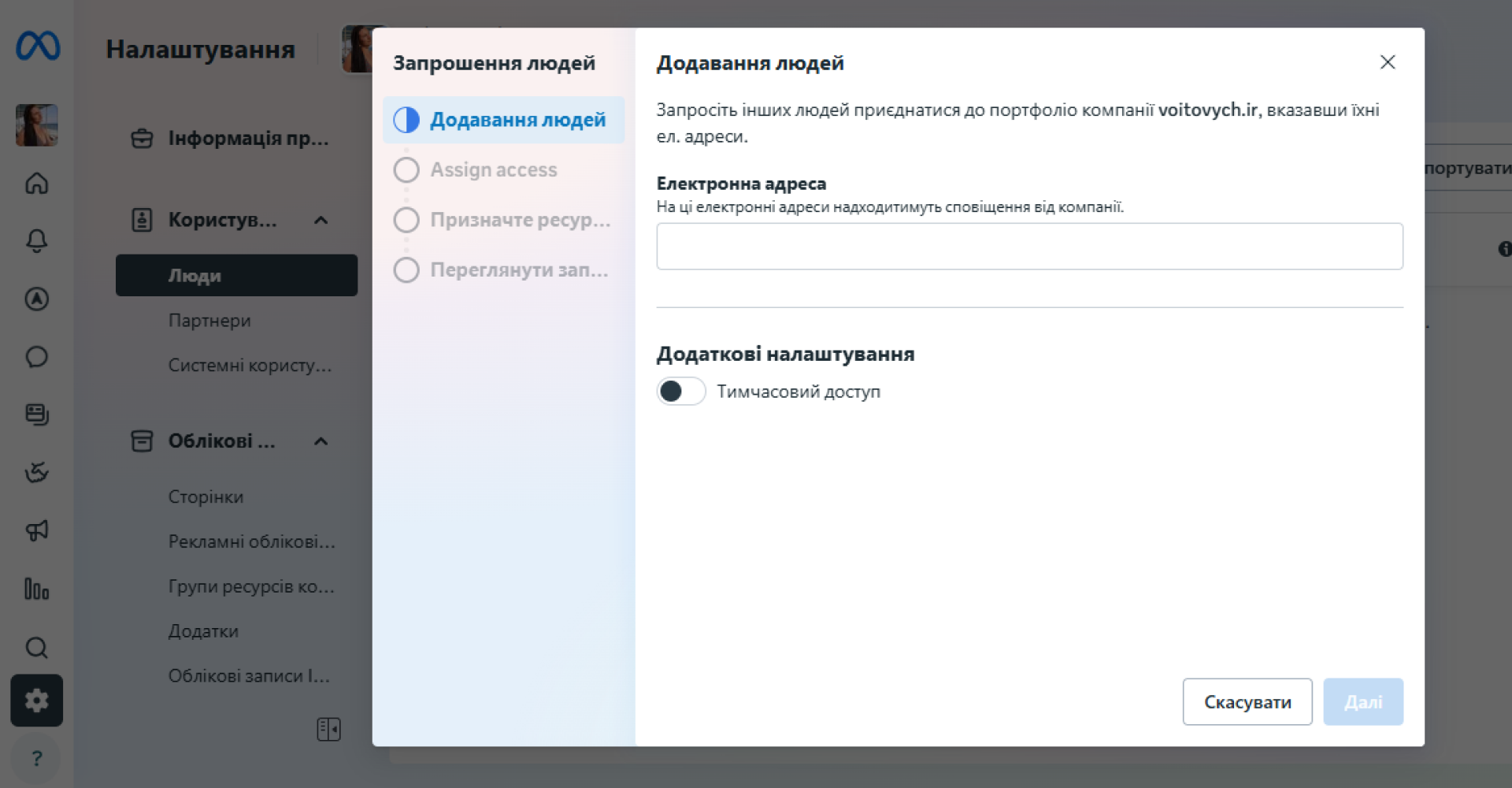
- Click Add.
- Enter the email address of the person you want to invite.
- Assign a role (for example, employee, company administrator).
- Next, allow access specifically to the advertising account:
-
- in the list of assets, select Advertising accounts;
- check the box next to the required account and set the role (for example, Advertiser, Analyst).
- Click Invite.
- The user will receive an email with an invitation – they must accept the invitation.
If you work with a partner company (not an individual), you can grant access to the advertising account as a partner – through the Partners tab in the Business Manager settings. Enter the ID of the agency or business and assign the appropriate role.
Granting access through Ads Manager (without Business Manager)
If you don’t use Business Manager, you can grant access directly from your Ads Manager account:
- Go to Ads Manager – either through the Facebook menu or directly to Meta Ads Manager.
- Go to Account Settings.
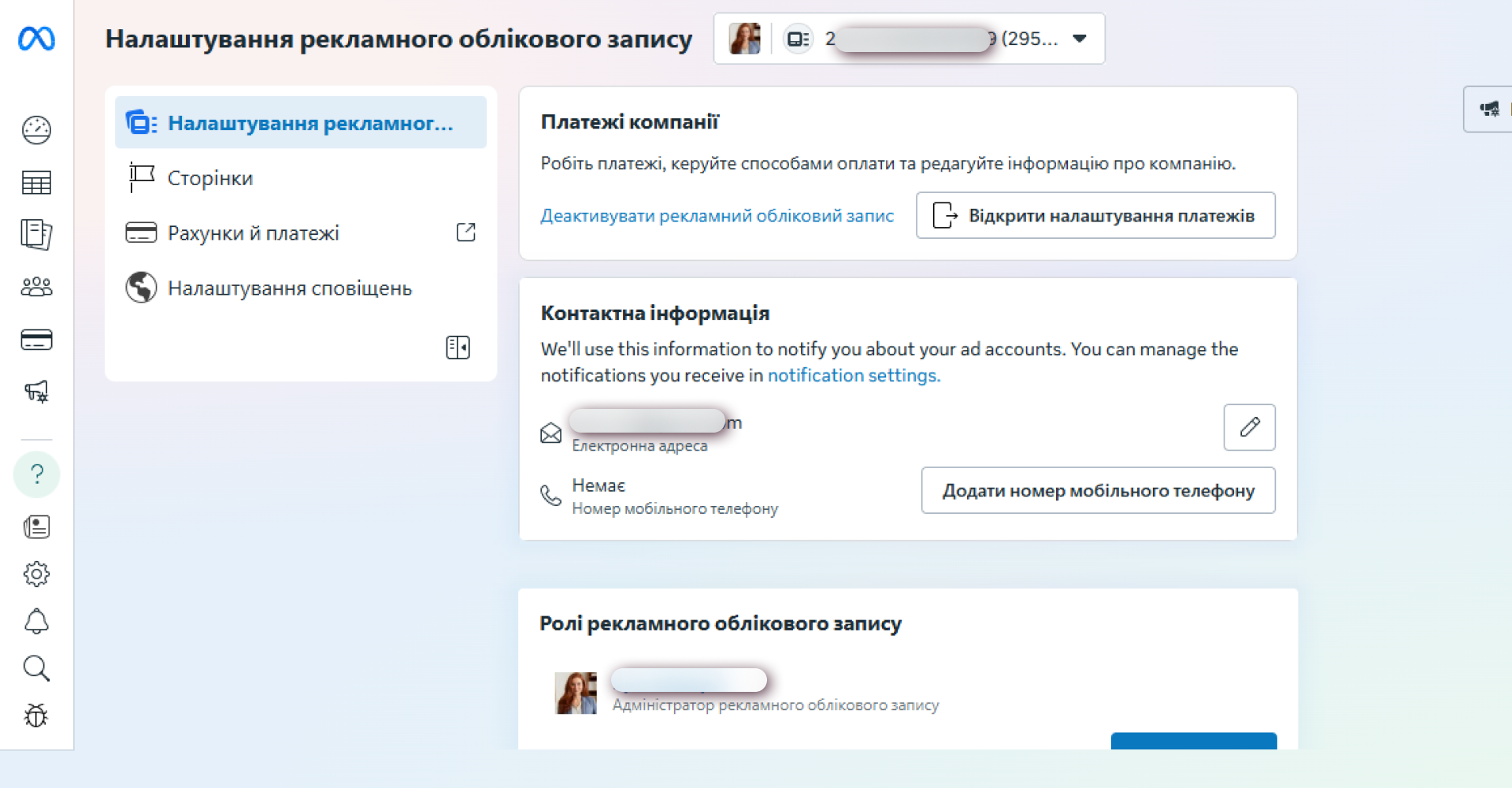
- Open the Account Roles tab of your ad account.
- Click Add People.
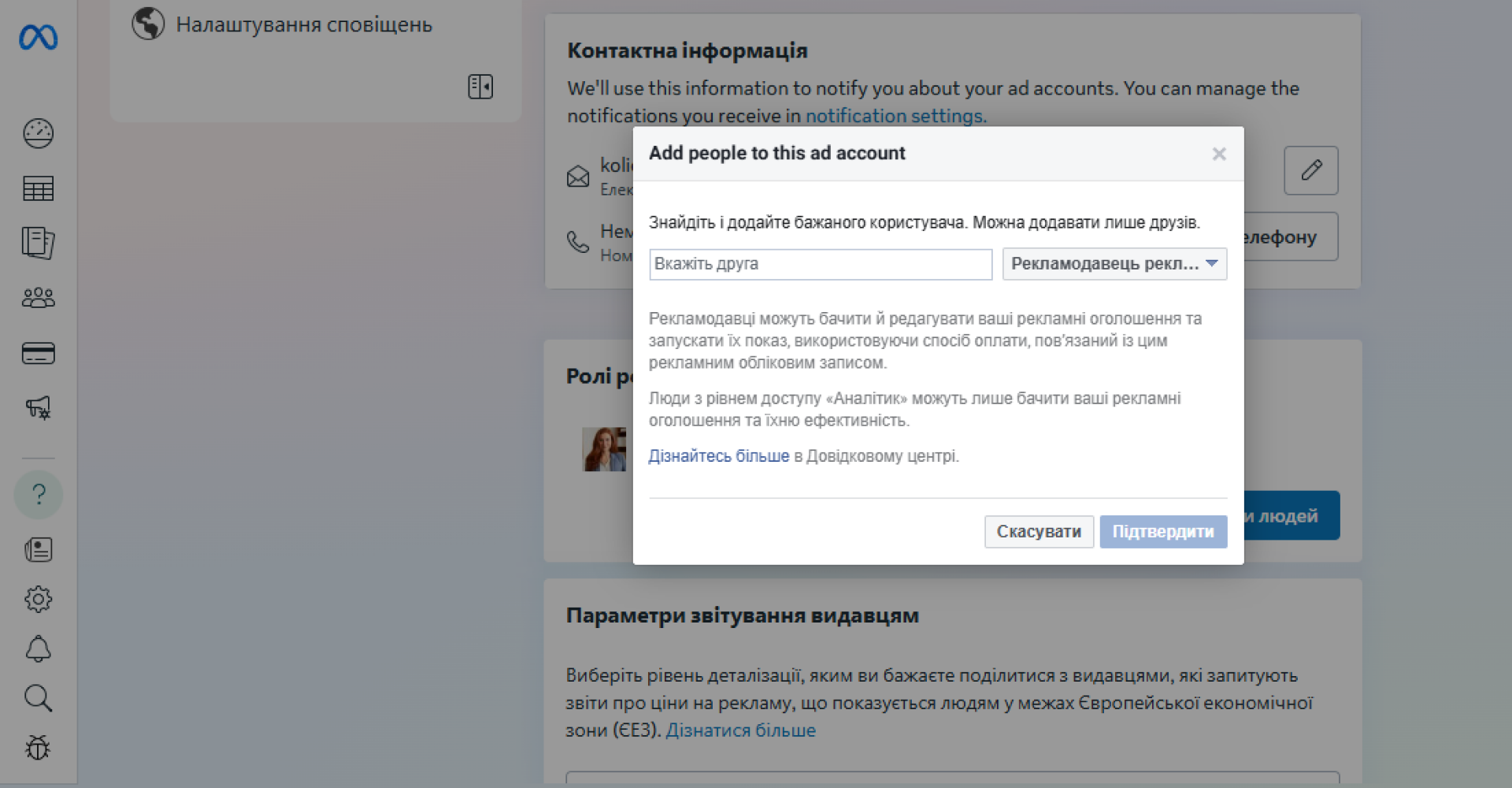
- In the field, enter the user’s name or email (the other user must be your «friend» on Facebook, unless otherwise specified).
- Select a role (Advertiser, Analyst, etc.).
- Confirm – the user will receive an invitation, after which access will be activated.
Both methods work, but through Business Manager, the process is more centralized, it is easier to control access and view the history of actions.
What to consider legally and administratively
Before launching an advertising campaign in Facebook Business Manager, you should pay attention to legal and administrative aspects. First of all, you need to check the relevance of the company’s data: the correctness of the legal name, address, and identification code, as this information may affect the interaction with the advertising platform. You should also customize the payment method so that it meets the financial capabilities of the business and internal accounting requirements. If you work with several contractors or partners, it is important to define access levels and rights in the system in advance to avoid misunderstandings and maintain control over company assets. In addition, businesses should provide for a procedure for documenting advertising expenses to ensure transparency of reporting and avoid tax risks.
Careful consideration of these aspects helps to avoid administrative or financial difficulties and creates the basis for the stable development of the advertising strategy. Thus, the proper organization of legal and administrative processes in Facebook Business Manager is the key to effective and safe use of the tool in the long run.

commercial offer
Other articles by the author

04/06/2024
The target audience is your potential customers, people who share common interests, pains, fears, desires, dreams, and needs. It is these users that your advertising campaign should be customized for.

07/02/2022
In this article, we have tried to collect everything that is known about this algorithm at the moment. Let's try to understand the peculiarities of the technology: how much will the usual search change and how will it affect traditional SEO promotion.

30/10/2025
Assessors (evaluation specialists, Search Quality Raters) are ordinary people hired by search engines or contractors to check the quality of search results.
Latest articles by #Useful tips

17/02/2026
Sitelinks are a set of internal links that Google sometimes displays below the main result in the search results.

28/01/2026
News websites operate in a fundamentally different way than corporate, e-commerce, or service resources.

19/01/2026
Links form navigation for users, transfer page weight in SEO, and determine how search robots scan your resource.