

 09/12/2025
  2292
2292

Інтернет-маркетинг
простою мовою
Content of the article
- /01 Benefits of Google Maps for local businesses
- /02 Google Maps ad formats and their role in sales
- /03 Step-by-step guide to launching ads on Google Maps
- /04 How to calculate the cost of promotion on Google Maps
- /05 Performance evaluation: key metrics and tools
- /06 Optimizing your profile and advertising campaigns

Promotion in Google Maps: opportunities for local businesses

Google Maps has become one of the key points of contact between customers and local businesses. People are looking not just for information, but for the closest solution «here and now» – the place where they can buy, order or receive a service with the greatest convenience. For businesses, being present on Maps means additional traffic to the point of sale, calls, bookings, and increased trust due to real reviews. In this article, we’ll look at how Google Maps advertising works and how to set it up, how much it costs, what metrics are important to track, and how to optimize results from the first weeks of operation.
Benefits of Google Maps for local businesses
Google Maps is a channel of interaction with the audience with already formed demand. Users open the map when they are ready to act: to choose a clinic, coffee shop, workshop, or store nearby. Compared to social media or classic contextual advertising, there is no warm-up phase.
So, let’s look at the main advantages for business.
- Catching the moment of demand.
Most interactions in Maps occur when the user is ready to buy or visit a place. This means a shorter path from browsing to contacting or visiting.
- Local relevance without manual segmentation.
The algorithm automatically shows companies near the user. Businesses do not waste resources on complex targeting, geography works as a natural filter.
- Free coverage thanks to organic impressions.
Even without paid advertising, a business card brings traffic if it is properly optimized: photos, categories, schedule, reviews, attributes. Advertising only increases visibility.
- Impact on trust and reputation.
The format of reviews and ratings creates «social proof» in real time. The map is one of the first places where potential customers check the reputation before visiting.
- Quick actions without going to the website.
A call, route planning, booking – everything happens in one click. For local businesses, this is critical in terms of conversion.
If approached systematically, Maps can generate a steady stream of calls even without large-scale advertising budgets.
Turn Google Maps into a constant source of customers
The WEDEX team will optimize your profile and set up paid advertising on Google Maps for maximum reach to local users.
Next, let’s take a look at what the ad format looks like in Maps and what exactly the user sees before clicking «Route» or «Call».
Google Maps ad formats and their role in sales
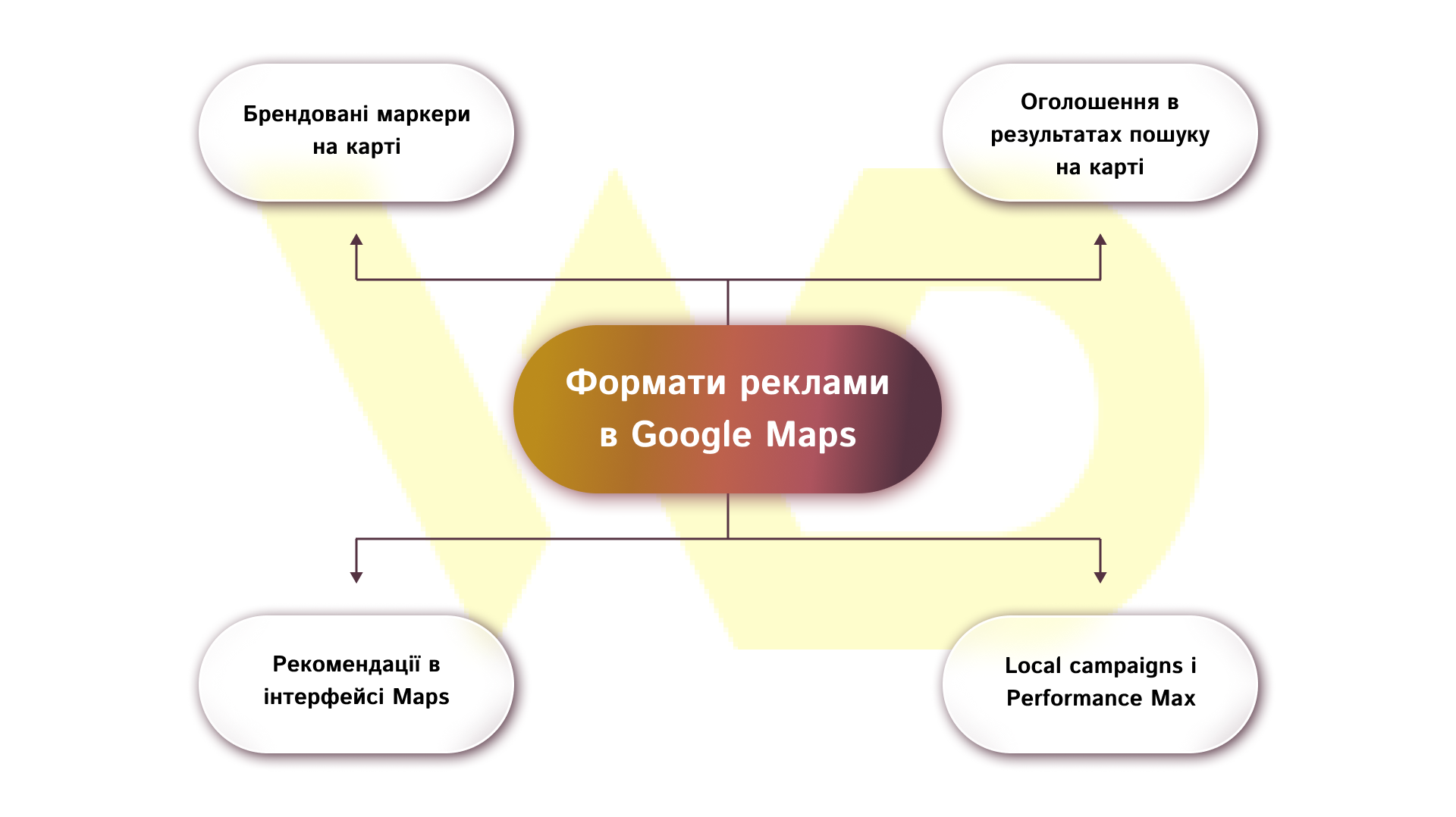
Google Maps advertising has several specific formats, each of which solves different business problems.
Promoted pins (branded markers on the map)
Promoted pins are noticeable markers on the map that stand out among organic points and attract the user’s attention when exploring a neighborhood or building a route. They can appear in the map view, in route guidance, and in the place card. This format works when you need to increase physical traffic at a point of sale or highlight a promotional offer in a particular area.
For local assets, use a clear logo and short, clear messages. Test impressions during peak activity hours – morning, lunch, evening. Track «Route» clicks and calls as the main conversions. These metrics most accurately reflect the real interest of potential customers.
Map search ads (ads in map search results)
Map search ads appear in Google Maps search results alongside organic listings. This is an effective tool for businesses that compete in queries with a high local intent (for example, «coffee shop nearby», «repair of household appliances»). This format gives you direct access to customers with a clear purchase intent.
Before launching, set up relevant categories and prepare local assets in your Google Business Profile. This will increase the relevance of your ads and the accuracy of your targeting. And after the launch, regularly monitor your CTR in Maps and the ratio of impressions → calls/routes. These metrics help you understand whether your ads are attracting the right audience and whether you need to adjust your creatives, bids, or geo-targeting.
Map suggest ads (recommendations in the Maps interface)
Map suggest ads appear as recommendations when you browse a particular place or region. They are suitable for attracting the attention of users who have not yet made a final choice but are actively researching options. This is a format for increasing awareness and generating interest at the local level.
Local campaigns and Performance Max – universal approaches for Maps
PMax is a targeted format with Google automation that distributes creatives across all networks, including Maps. Local campaigns are optimized for local actions (visits, calls), and Performance Max allows you to use machine learning to achieve the goal on all Google sites.
For a one-point business or short promotions, it is advisable to use Local campaign or Performance Max with local assets. For a multi-location network, set up location groups and use Performance Max or Local campaigns with precise geo-targeting. Be sure to track local conversions – visits to a location, calls, and route transitions.
The choice of format depends on the goal: to increase physical traffic, increase visibility in search, or scale the network coverage. In all cases, the key elements of success are the right local assets, clearly defined conversions, and an initial test period to collect data.
The next step is to prepare and verify your profile in Google Business Profile, as this is what determines the quality of impressions and the effectiveness of campaigns in Maps.
Step-by-step guide to launching ads on Google Maps
Let’s take a look at the step-by-step guide: from choosing a target to collecting the first data.

- Define your advertising goal.
First, formulate what exactly you want to achieve: visits to the point of sale, calls, route planning, or online conversions. The goal will determine the type of campaign, tracking approach, and key performance indicators.
- Prepare accounts and connections.
Make sure your Google Business Profile is verified and contains up-to-date information. Link your profile to Google Ads and connect Google Analytics. Also, import local conversions (calls, routes, online goals) into Ads for correct reporting.
- Prepare local assets.
Prepare a set of visual and textual materials for local ads: a logo, 3-6 high-quality photos, a short description, and short headlines. Also, create target URLs with UTM tags for analytics.
- Choose a campaign type and bid strategy.
For local tasks, Local campaigns or Performance Max with local assets are suitable. Choose a bidding strategy that matches your goal: maximize local actions or target CPA. Determine an initial test budget sufficient to collect the first data.
- Set up targeting by location and radius.
Specify specific addresses for a network or set a radius around a point for a single-point business. If necessary, organize groups of locations by priority and add exceptions by city or zip code to avoid unfocused impressions.
- Prepare creatives and ad copy.
Create short headlines with a clear call to action and relevant captions. Use a recognizable logo and realistic photos for labeled markers and local blocks. Make sure all elements display correctly on mobile devices.
- Launch and first checks.
Run the campaign in test mode and check the display of the card, phone numbers, and links. Make sure that conversion events (calls, routes, online goals) are recorded in Google Ads and Analytics. It is the accuracy of the settings that matters, not the scale of the budget.
- Collect initial data and make the first adjustments.
In the first 7-14 days, collect statistics on impressions, CTR, clicks, and calls. Based on the data, adjust creatives, targeting radii, and bids. Disable weak ads and boost those that generate the best local conversion.
- Optimize based on the results.
After the test period, transfer the budget to the locations with the highest profitability. Regularly test ad variations (A/B), update local assets, and adjust the time of the display according to the peak activity of the audience.
After completing these steps, your Google Maps campaign will be ready for scaling, which will be discussed further.
How to calculate the cost of promotion on Google Maps
The budget for Google Maps advertising is formed based on the goals that the business wants to achieve. Unlike classic contextual advertising, the emphasis here is on the local action of the user, so the key indicator is the cost of contact with the location.
Payment models and key metrics
Google uses automatic bidding strategies based on data about user behavior. The most commonly used models for Maps are:
- maximizing local actions (for launching and collecting initial data);
- Target CPA (after receiving stable conversions).
Here, CPA is not the classic «cost of an application» but the actual cost of an action that indicates an intention to come or contact: a call, a route request, or a visit confirmed by service data.
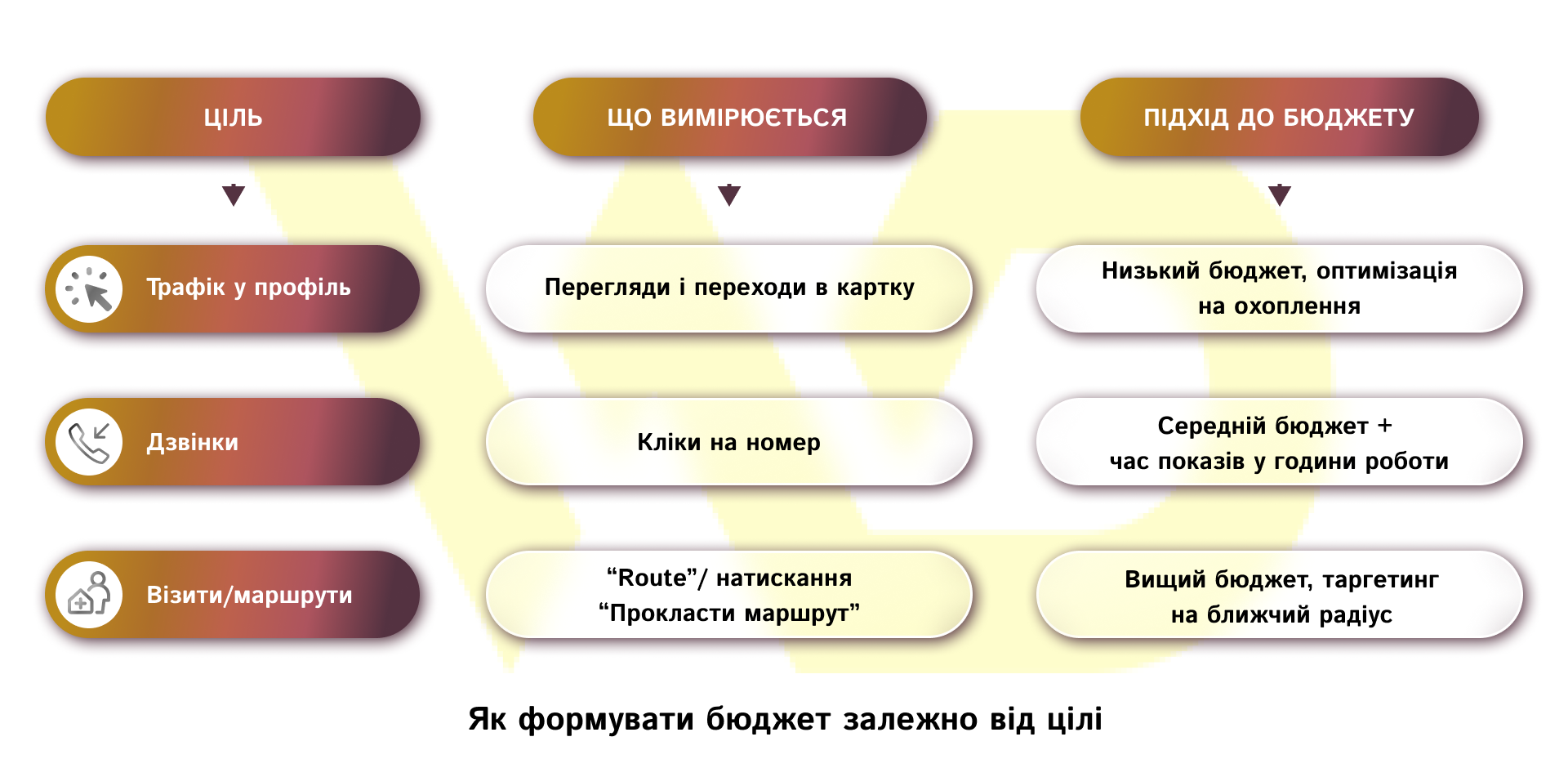
Practical examples of budget allocation
For a one-point business (small establishment, salon, offline services), the initial range is $5-10 per day. At this level, the campaign collects data on peak hours and typical conversions. After 1-2 weeks, budget adjustments to $10-15 allow you to consistently receive local actions with a predictable cost. The main KPI in this case is the cost of a route or call.
For a small network (2-5 locations), the budget is distributed unevenly: points with higher traffic and conversion rates receive +30-50% to the rate, while weaker ones receive minimal funding. The starting budget is approximately $10-15 per location with further optimization based on the results. In such campaigns, it is not the total amount of expenses that is more important, but the comparative efficiency of outlets.
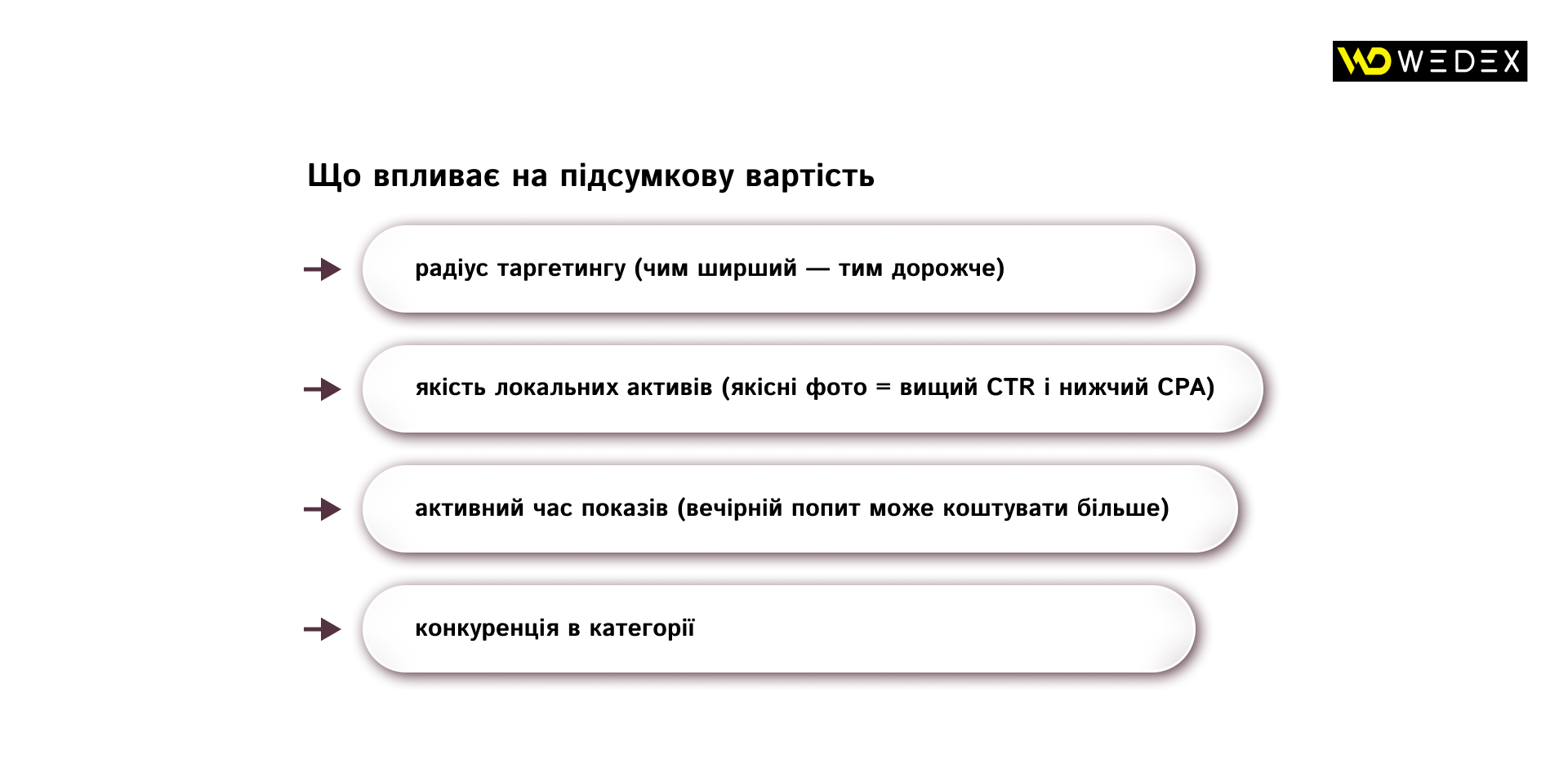
Proper budget allocation in Maps is always associated with a test period. After the first 7-14 days, you can adjust bids and reallocate the budget between locations depending on which ones provide the best CPA for calls and routes. This allows you to scale only effective points without formally increasing costs across the entire network.
Performance evaluation: key metrics and tools
For Google Maps advertising, the main performance indicator is not just views, but local user actions – a call, a route request, or a real visit. It is these actions that reflect the purchase intent and are most important for local businesses.
Key metrics for analysis
Key metrics include:
- Location views: how many users have seen a business on Maps;
- clicks on the «Route»: an indicator of the actual intention to visit the location;
- calls: direct contact with the business;
- conversions to the website: accompanying interactions that show interest;
- local conversions: data on actual visits, if Google can confirm them.
These metrics are available in both Google Ads and Google Business Profile, but in the context of advertising, it is more convenient to analyze them through Ads.
How to set up tracking
To correctly evaluate your performance, you need to set up local action tracking. First, turn on local conversions in Google Ads so that the system records calls and clicks on the route. Next, connect your Google Business Profile to your advertising account – this will synchronize locations and allow you to fully analyze user interactions with the point. If your business has a website, you should also transfer events to Google Analytics: this way you can see the full funnel from viewing the map to going to the website and leaving a request.
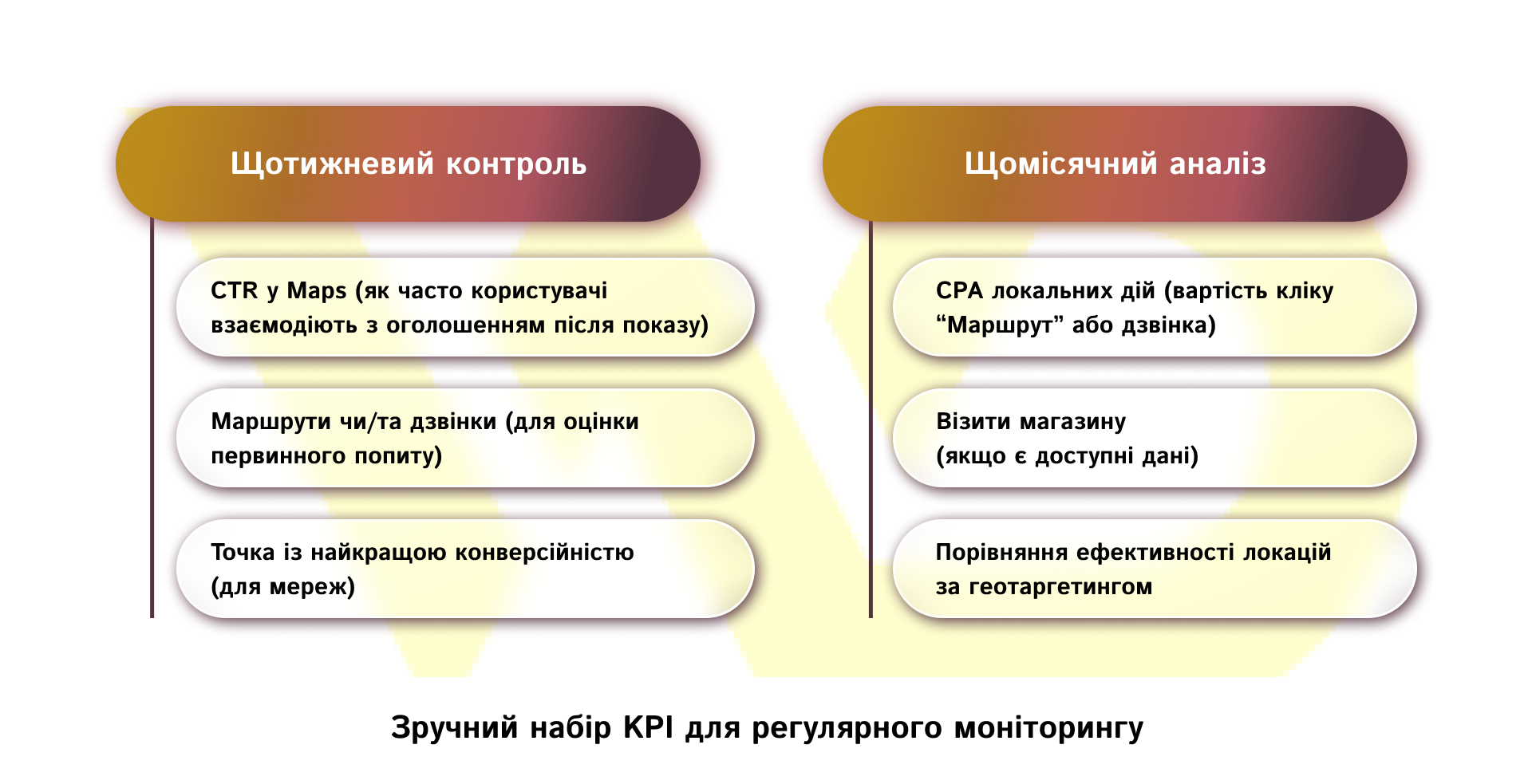
Performance evaluation should be based not on the amount of traffic, but on the quality of interaction with the point. This is what distinguishes advertising on Maps from classic contextual advertising: it is important to understand whether advertising costs are converted into physical calls to the business.
Optimizing your profile and advertising campaigns
For a Google Maps campaign to work effectively, it’s important to launch ads and constantly maintain the quality of your profile and optimize your settings. The map shows the best results for businesses that remain relevant, have relevant content, and have confirmed local demand.
Optimization concerns two areas: Google Business Profile and advertising campaigns. What to pay attention to:
- Update your profile content. Add relevant photos of products, interior, or menus, update opening hours, offers, and descriptions. This increases trust and improves rankings.
- Work with reviews. Respond to reviews in a timely manner and settle claims if necessary. Positive reviews directly affect visibility in local search results.
- Correction of geotargeting. Check the display radius: too wide a coverage reduces accuracy, too narrow a coverage limits real demand.
- Optimization by time. Increase impressions during peak demand hours and decrease them during ineffective periods.
- Testing of creatives. A/B testing of ads helps to determine which messages generate more calls and routes.
Thanks to this approach, Google Maps becomes not just a map visibility, but a stable local sales channel. For most businesses, this is one of the most affordable tools with a quick return on investment, as it appeals to users at the moment of real intention to visit a point of sale. Even without large budgets, promotion on Maps can provide a steady stream of customers and strengthen your local presence.

commercial offer
Other articles by the author

15/01/2026
Analyzing competitors' contextual advertising is not about spying, but rather a systematic approach to reducing risks and optimizing advertising costs.

19/11/2024
A PPC manager is a specialist who sets up advertising campaigns that are paid for by clicks on ads made by potential customers.
The key task of a PPC specialist is to increase the effectiveness of advertising and optimize it so that the client gets as much traffic to the website as possible at the best price and can earn more money.

27/09/2022
To get the best results, it's important to choose the right company to work with. There are many factors to consider when choosing a digital marketing company. The top 5 digital marketing companies in Kyiv that are described here are exactly in line with these factors.
Latest articles by #PPC

29/09/2026
A content pipeline transforms the creation of content from a spontaneous creative process into a managed production system. In such a system, AI serves as a powerful assistant.
10/09/2026
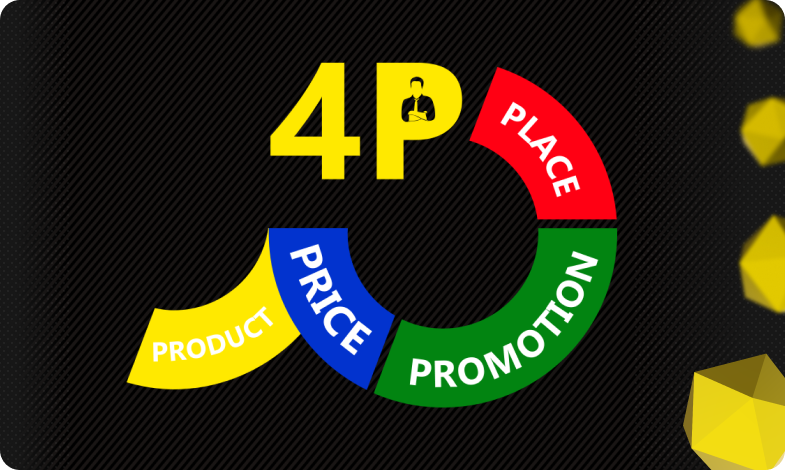
The 4P model serves as an architectural foundation that transforms disparate marketing activities into a single, manageable system.

08/09/2026
Today, an influencer is a distinct media platform with its own editorial policy, a keen understanding of its audience, and an established level of trust.