

 07/10/2022
  4297
4297

Інтернет-маркетинг
простою мовою

How to change payment settings in your Google Ads account
Quite often, advertisers need to change advertising payment methods or even reconfigure their accounts, for example, from an individual to a legal entity due to changes in payment details. There are many nuances in this issue that require care and focus, as such changes carry important information about accounting documents and expense reporting for your organization. Therefore, I would like to consider in more detail all the points of the procedure for such transformations.
If you have changed your address, payer (legal entity, individual, LLC, sole proprietorship), or organization details, you need to contact Google Ads technical support:
- Sign in to your Google Ads account.
- In the top menu bar, click “Help”

- Contact Google:
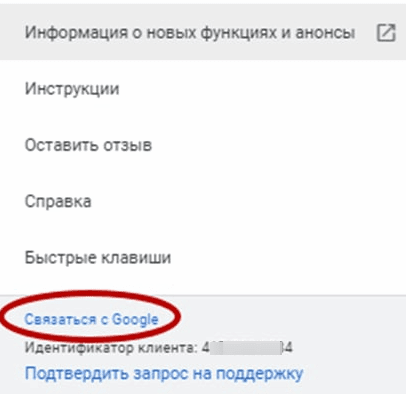
It should be noted that Google’s support has a specific work schedule for each country, respectively. For Ukraine, this is from 10:00 to 18:00 Kyiv time.
- Next, specify the necessary information – the reasons for contacting the support, the Google Ads client ID, and choose a convenient option for contacting support:

Please note that in light of the latest news and events, the option of contacting a support specialist by phone is often impossible, so you can communicate in real time via chat or send an email (you will not be left without a response).
The specialist, in turn, will offer to submit an application for changes to your account to the Google moderation service. To do this, a letter with the application form will be sent to the email address you provided. You will need to read it carefully, familiarize yourself with the terms of changing the payer at the bottom of the letter, and perform the procedure only if you agree to the terms and conditions specified below. And in response to the support email, send the form you have already filled out to make changes with the current details or the name of the account owner where the payment settings are being changed.
The application review procedure takes approximately 48 hours.
Here are some important points that cannot be ignored when changing the payer settings:
- No closing accounting documents are issued for credit card payments.
- Individuals are not issued any closing accounting documents.
- Closing documents for the new legal entity will be generated only after the change is made.
- After that, the new contact person will have to log in to the account and accept the new Terms of Agreement (by clicking on the banner above in the Payment section).
- If you change your payment details and make payments by bank transfer, you will receive a new current account for making subsequent payments.
- If you change your tax status, your account is suspended until you accept all the changes.
- After changing the payer and accepting the new terms and conditions on your part, the money from the old payment profile will not be transferred to the new payment profile.
- If there is a balance of funds credited to your account as a result of fulfilling the conditions of the promotional code, the money for the promotional code will not be transferred after changing the payer, it will not be possible to use it, and you will not be able to refund the amount of the promotional code. We recommend that you spend the bonus funds before changing the payer.
After that, you will receive an email that the payment settings have been changed in your account. You will only have to confirm this in your ad account by clicking the “Confirm” button in the settings.
Then you pay for your account with the changed payment settings and get new customers and conversions).

commercial offer
Other articles by the author
07/10/2022
Quite often, advertisers need to change their advertising payment methods or even reconfigure their account, for example, from an individual to a legal entity, due to a change in payment details. There are many nuances in this matter that require care and focus.

03/11/2023
How to quickly calculate the budget for advertising on Google? What should you start from to objectively assess your capabilities and resources? These questions are asked by almost all business owners and advertisers who have decided to promote themselves using Google services, because a well-crafted Google AdWords budget forecast is a guarantee of the success of an advertising campaign and its effectiveness.

25/10/2022
At our annual Search On event, we announced nine new ways to transform your shopping experience on Google, giving you a more engaging, informed, and personalized shopping experience. This experience is powered by Shopping Graph, our advanced artificial intelligence model that now understands more than 35 billion product listings - up from 24 billion just last year.
Latest articles by #PPC

02/07/2026
Choosing the wrong ad format is the main reason for a low return on investment (ROI) and the rapid depletion of a company's marketing budget.

26/03/2026
The benefits of integrating AI into PPC processes go beyond simply “faster text generation.” It’s about a fundamental shift in approach.

23/03/2026
AI-powered tools are no longer just an experiment. Today, they have become an integral part of the day-to-day operations of many PPC teams.