

 26/11/2026
 948

Інтернет-маркетинг
простою мовою
Content of the article

Generative output: what it is and how to check for yourself whether AI sees your business
You enter a query into Google, and instead of the usual list of links, it actually writes out the answer itself: it names companies, compares them, and lists their pros and cons. Or you ask ChatGPT where it’s best to order a service, and you get three specific names with a brief description of each. If your company isn’t among them, you might as well not exist for that customer. Even if your website ranks first in organic search results.
Let’s take a look at what generative search results are, how they work, why it’s hard to compete without them these days, and how you can check on your own, without expensive services what AI knows and thinks about your brand.
What is generative search results?
Generative search results are responses to a user’s query that a search engine or AI assistant generates on its own, based on information from multiple sources.
In a traditional search, the system simply displays pages, and the user navigates to them, reads the content, and draws their own conclusions. Here, AI does this for the user: it reads the sources, structures the information, and provides a ready-made answer. Links to websites, if any, are displayed alongside the answer as supporting evidence, rather than as the main content of the result.
When it first appeared
The timeline begins in November 2022, when ChatGPT became available to the general public. This tool was the first to show the average user that they could get a detailed answer to a question rather than just a list of links so people very quickly began asking the AI the same questions they had previously searched for on Google. As early as February 2023, Microsoft integrated generative responses into Bing (then called Bing Chat, now Copilot). In May 2023, Google unveiled its own experiment, SGE (Search Generative Experience).
In May 2024, SGE evolved into AI Overviews and appeared in Google’s main search results, initially in the U.S., and over the next year in most countries and in dozens of languages. In the fall of 2024, ChatGPT gained built-in web search with links to sources. In 2025, Google launched AI Mode a separate mode where the entire search results page becomes a dialogue with AI. Over the course of three years, generative responses went from being an experiment to a standard part of search.
Pros and cons
For the user, the main advantage is speed. There’s no need to open five to ten websites, compare them, and form your own opinion: the AI does this in a few seconds and immediately provides a selection, comparison, or recommendation. Plus, you can refine the answer in the conversation for example, by asking, «Now, just the ones that operate in Lviv», or «Which of these is cheaper?» without having to start the search over.
For businesses, generative search results open up a new opportunity: you can appear in the results even if your website isn’t in the top 3 organic search results. AI gathers information from many sources, and a mention of your business in a directory, review, or testimonial can also lead to your inclusion in the results.
People perceive AI-generated mentions as recommendations from an independent expert, so they trust them far more than they do advertisements. And traffic coming from AI is usually «warm»: the person has already read about you, compared you to others, and is visiting your site with the intention of making a purchase.
There’s also a downside. AI sometimes makes mistakes: it uses outdated data, confuses companies with similar names, or presents an old negative review as current fact. Users don’t always see where the information comes from and don’t verify it. For businesses, this means fewer clicks, since some people get the answer they need and don’t visit the website. It’s impossible to fully control what AI writes about you. And measuring your presence in generative search results is more difficult than tracking traditional search rankings.
Types of generative search results and what they look like
AI Overviews (AIO), AI-generated summaries on Google
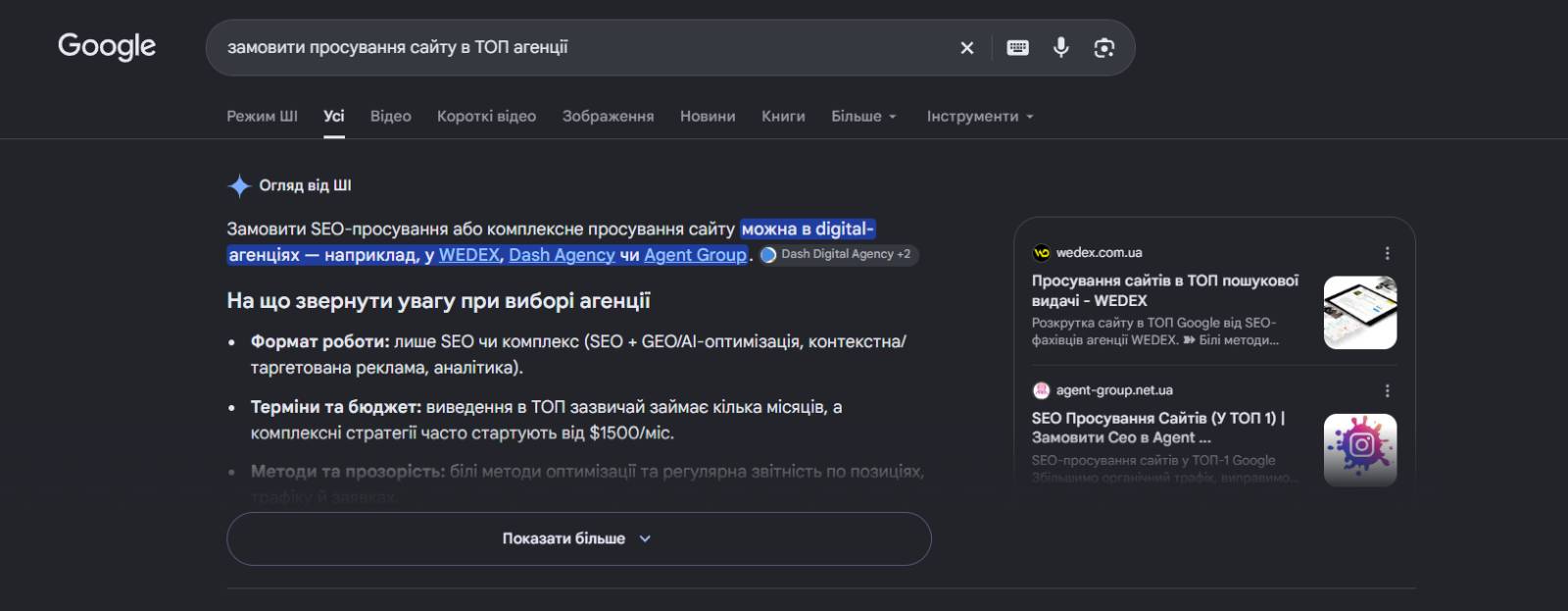
This is a block at the top of the search results page that appears above the organic results. It consists of a short text answer to the query, sometimes with a list or a small table, and source cards on the side or below the text showing where the AI got the information. Below that are the usual results: ads, maps, and organic results. Users see the AI Overview first, and it’s often enough for them to form an opinion.
AI Mode, Google’s AI mode
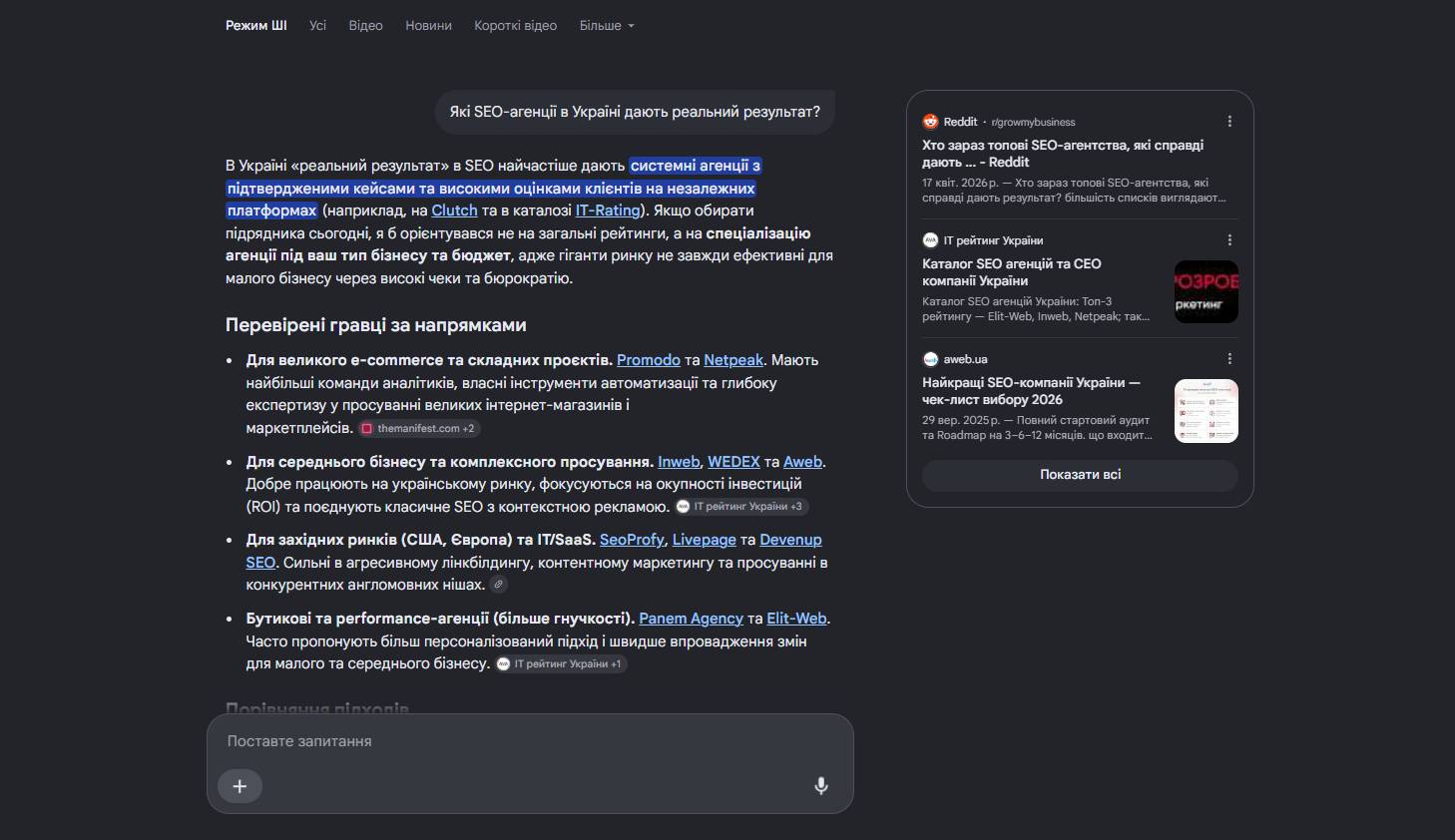
This is a separate tab next to the other tabs: «All», «Images», «Videos», «News», etc. When you click on the «AI Mode» tab, the search results are completely transformed into a chat. Google writes detailed responses, creates comparison tables, groups options by criteria, and displays links to sources on the side. The main difference from AIO is that you can continue the conversation: ask follow-up questions, and Google remembers the context of previous questions. In fact, this is no longer a search but a consultation.
Response from an AI assistant
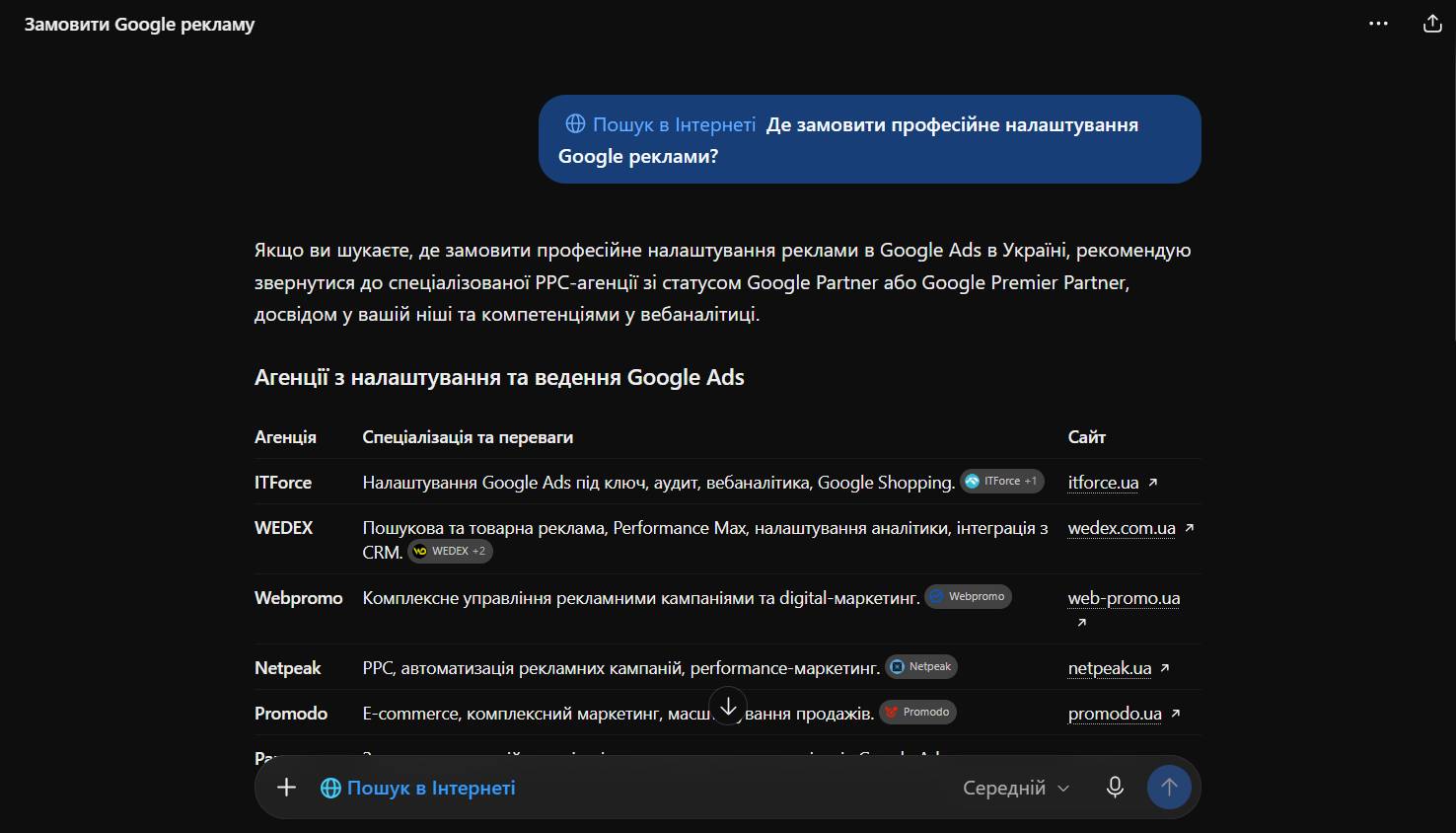
Here, the user doesn’t even open a search engine; instead, they type their question directly into ChatGPT, Gemini, Claude, Perplexity, or Copilot. The assistant responds either from its own knowledge base or by searching for information online in real time (and such cases are becoming increasingly common). The answer sounds like advice from a consultant, for example: «Here are three companies worth considering; here’s how they differ, and here’s what customers are saying about them». Sources are cited as links within the text or footnotes at the end.
What generative output is based on
The easiest way to imagine AI is as a very attentive shopper who, before making a decision, reads through everything they can find about a company and cross-references information from various sources.
- Your own website. AI reads service descriptions, prices, case studies, terms of service, contact information, the «About Us» page, and FAQ sections. It’s not just what’s written that matters, but also how it’s written: the information must be easy for a machine to «read». A clear page structure, headings that answer specific questions, and micro-markup all help. If your website doesn’t provide a direct answer to questions like «how much does it cost” or «how long does it take», the AI will look for the answer elsewhere and there’s no guarantee it will find the correct one.
- Everything written about you on other platforms. These include industry directories, aggregators, rankings, roundup articles such as «Top 10 Companies in…», media publications, discussions on forums and Reddit, and YouTube videos. The more independent sources mention your brand in the right context, the higher the likelihood that AI will consider you worthy of a recommendation.
- Data Consistency. If your website, Google Business Profile, directories, and articles about you all list the same address, specialization, experience, years in business, and list of services, the AI will perceive this information as reliable. If in one place it says you’ve «been in business since 2015», but in another «since 2018», or if an old address is still listed in a directory, trust drops, and the AI may either ignore you or provide the user with incorrect information.
- Reviews and reputation. Google Maps, review sites, industry-specific platforms, and social media: AI uses these to build a sort of «character» for the brand. In other words, it looks at what the company is praised for, what people complain about, and how it responds to criticism. This is where phrases like «customers note fast delivery, but sometimes complain about communication» come from.
- Freshness and relevance of information. For queries involving «now», «in 2026», or «current», AI favors newer sources. A website that hasn’t been updated in two years and profiles where the last review was posted three years ago lose out to active competitors.
Hence the main conclusion: you won’t make it into generative search results just by optimizing your website. You need a consistent brand presence across the entire internet, where the website is just one part of the whole.
Why is it even necessary to appear in generative search results?
Just a few years ago, AI was a tool for programmers, marketers, and enthusiasts. Today, it’s an everyday guide for ordinary people. People ask ChatGPT which vacuum cleaner to buy for 15,000 hryvnias, which English school to choose for their child, which auto repair shop in the area is reliable, and how one insurance company differs from another. People use AI to select products, search for services and contractors, compare companies, and check reputations: whether a company can be trusted, what’s being said about it, and whether there have been any scandals.
What this means for businesses
Generative responses are already playing a role in most purchases and in the selection of services or suppliers. AI has become a distinct stage between «learning about the company» and «making a purchase». It’s important to understand this even for those whose contextual advertising, SEO, and targeting are working well. A significant portion of buyers who come from these channels will still ask AI about your reputation before making a decision. If the AI doesn’t recognize you, confuses you with someone else, or brings up old negative information, you’ll lose a customer whose attention you’ve already paid for with your advertising budget.
When a brand appears in generative search results and is presented correctly there, you receive a recommendation from a «neutral expert» one that people trust more than any advertisement. You can see exactly what’s being said about you and influence it, rather than finding out after the fact from customers who’ve gone to competitors. Plus, while traffic from AI is small in volume, it converts better because people arrive at your site having already almost chosen you.
Make your brand stand out in AI responses
WEDEX experts will help you optimize your website for generative search so that AI better understands your brand, services, and benefits. We’ll develop a GEO strategy that will boost your SEO and help increase your company’s visibility in AI responses.
Why it’s important to start moving in that direction right now
To be honest, we should have started a year ago to be among the first, while competition in this channel was minimal. But the longer we put it off, the more it costs. And there are several reasons for this.
- AI has already gone mainstream. It’s no longer just a service for experts: people use it as a daily life advisor and consultant, every day and for a wide variety of questions. The habit of asking AI is taking hold just as the habit of «Googling» once did, and there’s no turning back. This audience will only continue to grow.
- Google itself is shifting to AI-powered search results. AI Overviews and AI Mode aren’t experiments they’re a strategic direction for the company: this way, Google resolves users’ questions and pain points faster, without forcing them to click through websites. The more queries are answered with generative responses, the less traffic websites receive from traditional organic search alone and the more important it becomes to be featured in the response itself.
- AI has become an additional, mandatory step in the decision-making process before purchasing a product or service. Checking out a company on ChatGPT is becoming just as natural a step as reading reviews on Google Maps.
- AI has a certain inertia. If the model has already gotten used to recommending specific competitors in your niche because they’re widely written about and frequently cited it will be much harder to displace them later than it is to secure a spot now, while their positions haven’t yet solidified.
Ways to check how AI perceives you
There are already many services on the market that measure brand visibility in AI, but most of them are expensive, especially if you use them regularly rather than just once. The good news is that even without a budget, you can put together a basic but very useful picture on your own manually, using free plans and trial periods from AI services
Manual prompts
First, select two or three AI systems that your customers use most often. In Ukraine, these are primarily ChatGPT, Gemini, and Claude. It’s also worth checking out the AI Overviews on regular Google, since this section is visible to anyone searching via the search engine even without opening any AI assistant.
Next, think about exactly how your potential customers will formulate their queries. It’s best to put yourself in the shoes of a customer who doesn’t know anything about you yet, or to recall how customers phrase their questions during consultations and in emails. Prompts should fall into three categories.
| Prompt type | Examples |
|---|---|
| Recommendation | «Recommend a reliable [service] company in [city]», «Where is the best place to buy [product] in Ukraine?» |
| Competitor comparison | «Which is better: [your brand] or [competitor]?», «Compare the TOP-5 [service] companies by price and quality» |
| Reviews and reputation | «What are the reviews about [your brand]?», «What do people say about [brand], can it be trusted?» |
Next, enter each prompt one at a time into each selected system and save the responses along with the sources the AI references. To ensure accurate results, open a new chat for each query or use incognito mode: this way, the response won’t be influenced by your previous chat history. If the system allows you to enable web search, turn it on, because that’s how the AI responds to most users.
This way, you’ll gather the AI’s perspective on you and your business. You’ll see whether you’re mentioned at all and where you rank on the list, who the AI recommends instead of you, and what arguments it uses.
The most valuable insight is seeing where the AI draws its perspective from: which websites, directories, articles, and reviews it cites.
If the same ranking or directory appears in all the results and you’re not listed there, that’s a specific goal: you need to get listed there. If a competitor is mentioned because of detailed case studies on their website, and you don’t have any case studies, that’s what you need to add.
Brand-related queries for your brand
The second area is to check how well the AI knows your specific brand. The queries here are direct:
- «What do you know about the company [brand]?»,
- «What does [brand] do, how long has it been on the market, and what services does it provide?»,
- «What are the pros and cons of the company [brand]?».
You need to carefully compare the answers with the actual situation.
What information will you receive and why
You’ll get a portrait of your brand as the AI sees it and as it will present it to your potential customers. This often reveals unpleasant surprises: an outdated address, services you haven’t offered in a long time, an incorrect specialization, confusion with another company with a similar name, or a single old negative review that the AI presents as the brand’s defining characteristic. It’s important to check where the AI sourced this data and correct it at the original source: update the information on your website, in your Google Business Profile, and in directories; address reviews; and add fresh, relevant mentions. Once the original sources are corrected, the AI’s response will eventually change as well.
Metrics from various services
In addition to manual checks, data can be collected from paid SEO services. Some of them offer demos or trial periods, which are more than enough for a one-time analysis.
Ahrefs
In Ahrefs, the Brand Radar tool is responsible for AI visibility.
It shows how often your brand is mentioned in AI system responses (AI Overviews, ChatGPT, Perplexity, Gemini, Copilot) and what share of mentions in your niche you hold compared to competitors that is, your Share of Voice. You can also see the contexts in which you’re mentioned and which pages of your site the AI uses as sources. Additionally, in a standard organic keyword report, you can filter for queries where Google’s search results include an «AI Overviews» block and see if your website is cited there. The main value of this data is that it shows not only your presence but also your position in the «conversation» about the niche relative to your competitors.
Serpstat
Serpstat focuses on analyzing Google search results. The service shows which queries in your niche trigger the AI Overview block in search results and allows you to filter keywords based on the presence of this element both in domain analysis and in semantic selection. Rank tracking also takes these special search result elements into account. This data shows which part of your semantic core is already «covered» by AI-generated results. It’s becoming increasingly difficult to get a click from traditional organic search for these queries, so it’s especially important for them to appear in the AI Overview as a source.
Semrush
Semrush offers a dedicated suite of tools for AI visibility (AI Visibility / AI SEO Toolkit). It tracks a brand’s overall visibility in AI systems (ChatGPT, Google AI Mode, Perplexity, Gemini), the number of mentions, its share relative to competitors, and the sentiment of those mentions: positive, neutral, or negative. You can also see which sources the AI cites when discussing your niche. Additionally, in standard reports on position tracking and organic analysis, you can see which keywords trigger the AI Overview and whether your domain appears in it. Thanks to its sentiment analysis, Semrush answers not only whether you’re being mentioned, but also how exactly.
Metrics from Google Search Console
Search Console has a separate «Generative AI» section. It shows how your site appears in Google’s generative answers that is, in AI Overviews and AI Mode. This is the only source where Google itself, without relying on third-party services, shows a site’s presence in AI search results. That’s why this is the best place to start your analysis.
In this section, you can see how many times your site appeared in generative answers and how many clicks they generated. You can view the search queries for which the AI cites you, as well as the pages it uses as sources. This data answers two key questions: on which topics does Google already consider you an expert, and which pages are «performing well» in generative search results. If the AI mostly cites your blog, while your commercial service pages hardly appear at all, that’s a red flag. You should refine your commercial pages by adding clear answers to customer questions, pricing, terms and conditions, and case studies.
It’s helpful to compare this data with standard organic search results. Sometimes a page ranks low in traditional search results but regularly appears in AI Overviews. And vice versa: a page may be in the top 3 organic results but not appear in generative answers. The second scenario represents the most obvious area for growth: Google already trusts the page, but the information on it is presented in a way that prevents the AI from extracting a ready-made answer from it.
The metrics from the «Generative AI» section should be recorded in the visibility log every month along with the results of manual checks. This makes it clear whether impressions in AI search results are increasing following changes to the website and external sources.
Metrics from Google Analytics
In Google Analytics 4, you can see exactly which AI systems visitors are coming to the site from. The easiest way is to view the «Traffic Acquisition» report, broken down by source and session channel, and look for sources such as chatgpt.com, gemini.google.com, perplexity.ai, claude.ai, or copilot.microsoft.com. For convenience, it’s a good idea to create a separate «AI» channel group that will automatically collect all such traffic based on a regular expression in the source field:
chatgpt|openai|gemini|perplexity|claude|copilot|bard
Look not only at the number of visits but also at conversions and user behavior: AI traffic is usually low, but visitors arrive with a clear intent, so they convert better than average. Clicks from AI Overviews and AI Mode aren’t tracked separately in GA4; they’re included in regular Google organic traffic. You can view their numbers in Search Console, under the «Generative AI» section.
Find out your brand’s visibility in AI
Order SEO or comprehensive promotion from WEDEX and get a free AI brand audit. Assess your visibility in generative search and identify opportunities for further GEO promotion.
Conclusion
AI responses are constantly changing: models are updated, new sources emerge, and competitors are also starting to work with this channel. Therefore, a single measurement isn’t enough it’s the trends that matter. The simplest solution is to keep a sort of visibility log for example, in a regular Google Sheet where you record the results of manual checks using the same set of prompts once a month:
| Field | Value |
|---|---|
| Date | 01.12.2026 |
| AI system | ChatGPT |
| Prompt | Recommend a company for… |
| Type | Recommendation |
| Were we mentioned? | Yes |
| Position | 2 |
| Competitors in the response | Competitor A, B |
| Sources | website, directory X |
| Sentiment | Positive |
| What to fix | Add case studies to the website |
If you track the monthly metrics from Google Analytics (AI-driven traffic) and Search Console (the «Generative AI» section) side by side, within a few months you’ll see which actions were effective, which new sources have started citing you, and how your share of generative search results is growing.
Generative search results are no longer just a future trend but one of the main channels through which customers choose a company. And it’s better to know for yourself what AI is saying about your business than to find out from a customer who has gone to a competitor.

commercial offer
Other articles by the author

08/10/2018
In 90% of cases, an entrepreneur who has decided to develop his or her business online faces a small problem when choosing a contractor for its promotion. Now I propose you to consider three possible options for choosing people who will be responsible for the development of your website, namely working with a private freelancer, a marketing agency, or inviting a specialist to your office.

15/09/2025
Let's look at the main types of customers, their characteristics, and the most effective approaches to interacting with each of them.
29/09/2023
The Google Adwords advertising service (Ads) is a system for setting up and placing contextual advertising in the search engine, on Google websites and on partner resources in the contextual media network. It is also the world's first service in terms of the number of advertisers and consumers of contextual advertising (search, display, and product).
Latest articles by #Useful tips

02/10/2026
For businesses, CPL is the primary metric for measuring how effectively ads and landing pages convert cold traffic into initial leads.

24/09/2026
While feeds were previously viewed as a purely technical feature for running contextual ads in Google Ads, today their quality directly determines the share of impressions across all sales channels.
16/09/2026
Choosing between search engine optimization and pay-per-click advertising is one of the most critical decisions when developing a marketing strategy.