

 17/04/2026
  1803
1803

Інтернет-маркетинг
простою мовою
Content of the article

SMM process automation: how AI helps to manage social media

Automation of SMM processes is a practical necessity for businesses that operate in the face of a large flow of content, limited resources, and constant competition for audience attention. Artificial intelligence helps to prepare content for different platforms faster and reduce the amount of routine in the daily work of the team. In this article, we’ll look at how Google Sheets and GPT can be used to manage social media, what processes should be automated, how to build high-quality promos, and what to look for to make such a system really work for your business.
Google Sheets as a working base for SMM and marketing
Google Sheets is convenient to use not as an ordinary spreadsheet, but as a work center for content. It allows you to create a content plan, specify the topic, format, target audience, publication channel, deadline, and person in charge, and then automate some of the preparation of materials.
Google officially supports add-ons for Sheets, and the installation takes place through the Extensions → Add-ons → Get add-ons menu. Google also notes that Apps Script allows you to add your own menus, dialogs, and sidebars to Sheets, which means you can turn a spreadsheet into a more complex working tool.
For a marketer or SMM specialist, this is convenient for several reasons:
- the entire process of working with content is in one file: from idea to finished text;
- the spreadsheet is easily scalable for several projects or clients;
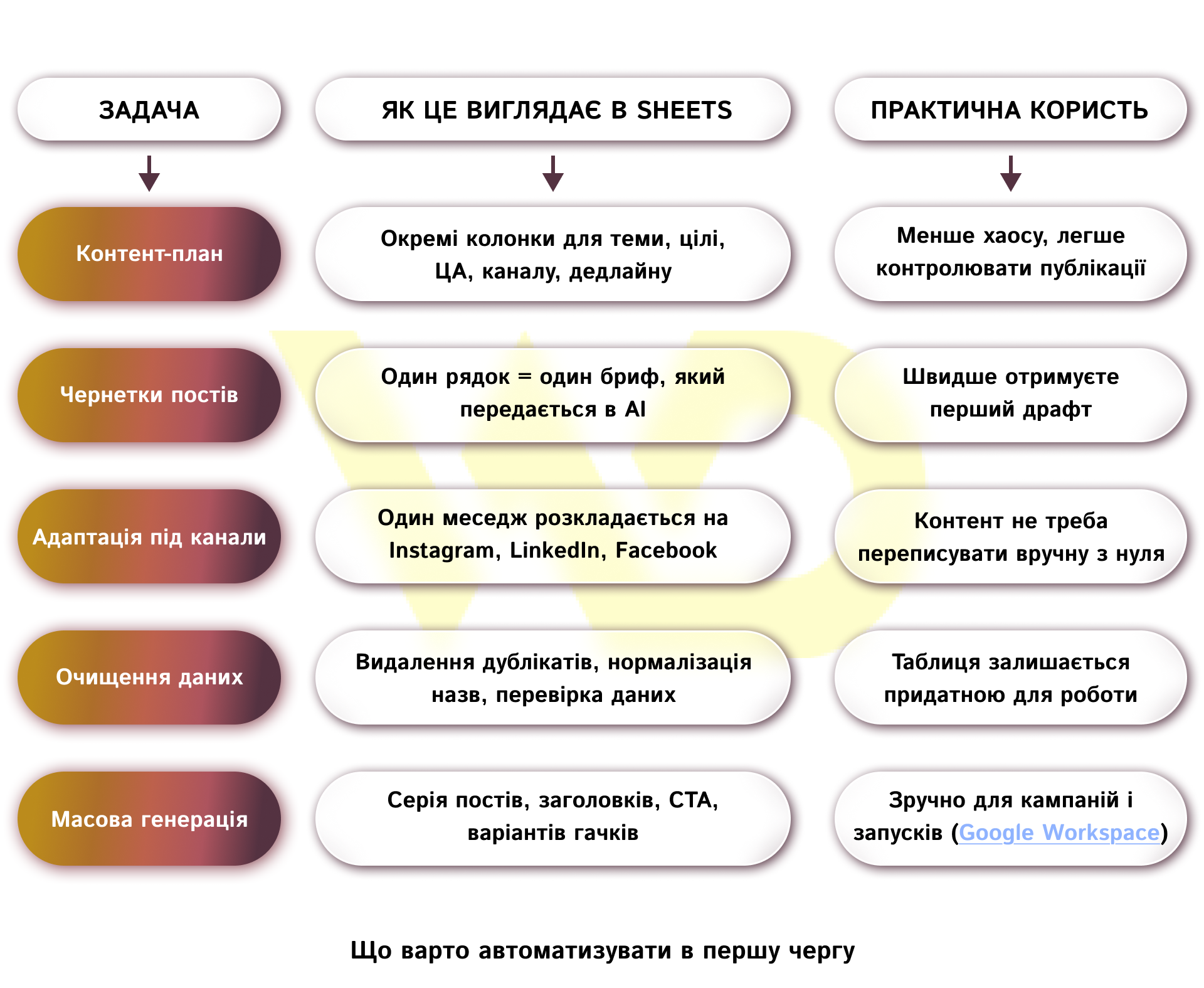
- Google Workspace Marketplace already contains AI solutions that are specifically designed to work with spreadsheets.
For example, GPT for Sheets™ and Docs™ is positioned as a tool for working with data and content: it allows automating the cleaning and analysis of information, as well as mass text generation, their adaptation to different channels, and the rapid transformation of data into structured content for marketing purposes.
Automate content creation with GPT in Google Sheets
It’s important to follow the rule: one line in a spreadsheet is one task. In the columns, you can record the topic, product, goal, Tone of Voice, required text length, platform, and target user action. After that, GPT receives not a vague request like «write a post» but a structured task with clear parameters. It is this approach that gives a better and more stable result than chaotic monosyllabic commands. OpenAI’s recommendations also boil down to the fact that instructions should be clear, located at the beginning of the request, and the context should be separate and understandable.
In Google Sheets, it is convenient to start with generating topics. For example, GPT List can be used to generate a list of 10 ideas for a single campaign, separate topics for a series of posts, or a set of headlines. Then, based on this list, you can create drafts of posts for Instagram, LinkedIn, Facebook, or email campaigns. This approach is especially useful when you need to quickly gather a large amount of content for a launch, seasonal offer, or promotional campaign.
How to get the best texts from GPT
We have already mentioned that the quality of the result directly depends on how clearly the task is formulated. If you need a post for Instagram, it should be a separate request. If you need a business text for LinkedIn, it should be another. If you need a lead magnet or a short landing page, it should be a third. One type of task in one promo almost always works better than trying to combine strategy, text, and formatting at once. Let’s take a look at specific examples of promos.
For an Instagram post
Write a short post for Instagram on [topic] for the [target audience]. Tone of Voice: friendly, professional, without complicated wording. The purpose of the post is [purpose]. Add a strong first line, the main benefit to the reader, and a call to action at the end.
For business writing on LinkedIn
Write a business post for LinkedIn on [topic] for an audience of [target audience]. The style is professional, concise, and expert. You need to show the practical value of the topic for business. Make the text structured, without unnecessary emotionality, and add a soft call to action.
For a lead magnet
Create a lead magnet structure on [topic] for the [target audience]. Format — [checklist / mini-guide / PDF / table]. As a result, submit: a title, a brief description, 5-7 main blocks, and a call to action that motivates to download the material.
For a short landing page structure
Create a landing page structure for [product/service]. You need: a headline, a subheading, a block about the problem, a block with a solution, benefits, social proof, and a call to action. The text should be understandable for the [target audience] and conversion-oriented.
For a series of topics in the content plan
Generate 10 topics for a content plan on [topic] for your audience [target audience]. The topics should be practical, relevant, and suitable for publishing on business social media.
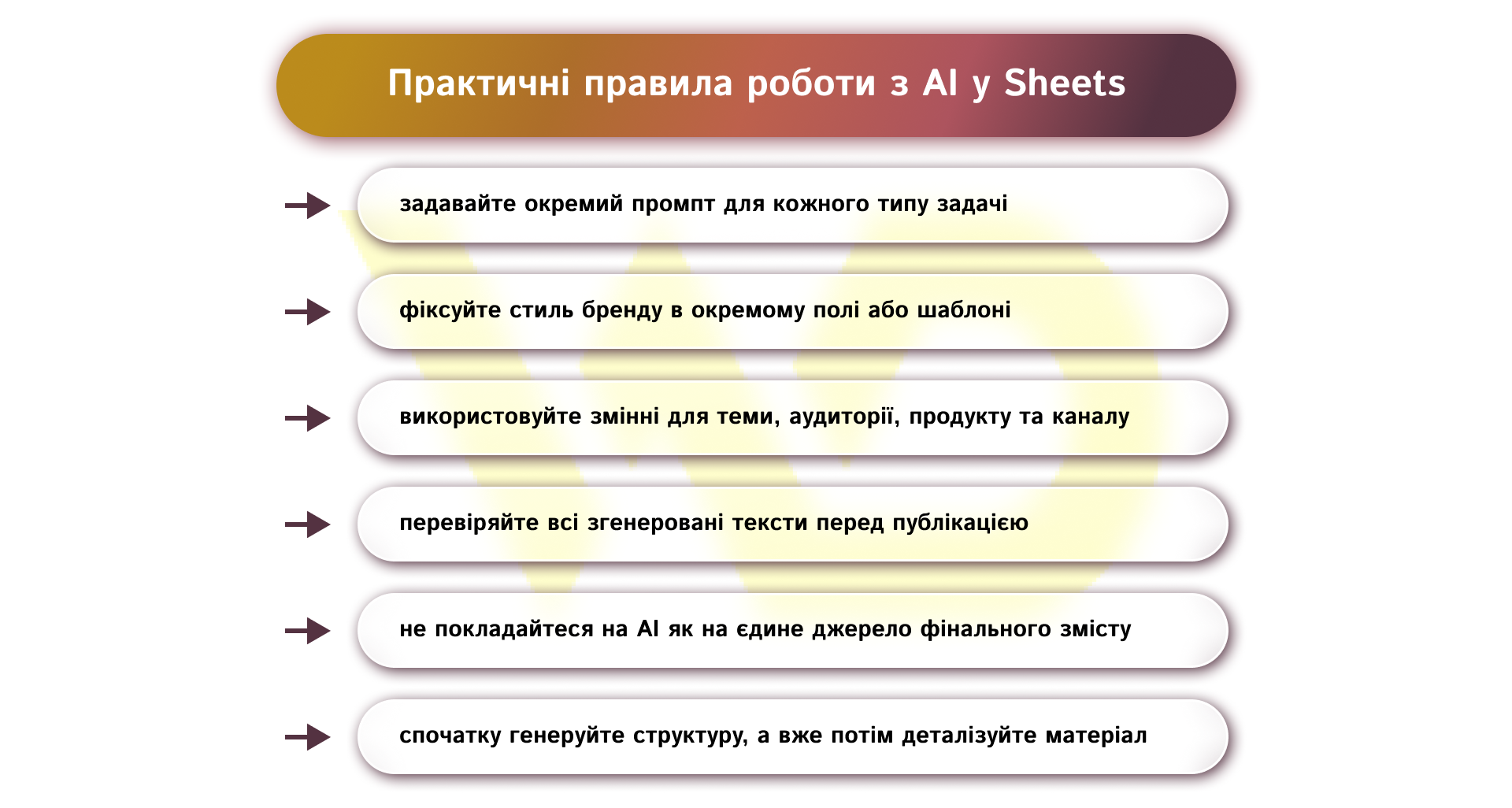
OpenAI recommends putting the most important instructions at the beginning, being specific, and, if necessary, separating the instructions from the data with a clear separator. It is also useful to include an example of the desired format or style. This is especially important for brands, as Tone of Voice should remain consistent across all channels, even if texts are generated automatically.
Why this scheme is useful for business
Google Sheets with GPT works well when the process is repetitive. For example, a company regularly publishes promotional posts, announcements of new services, brand news, or a series of materials for a single campaign. In this case, AI takes care of the mechanics, while the team focuses on strategy, editing, fact-checking, and brand compliance.
In addition to posts, Sheets with AI can be used for analytical and structural tasks. Sheets can be used to build content matrices, do basic audience segmentation, compare offers, form hypotheses for launches, or build a framework for a lead magnet. In this sense, automation helps not only to «write faster» but also to streamline marketing work in general.
Another thing to consider is the integration of Google Sheets with other tools that are already used in the team’s work. For example, Notion or Trello are used to manage tasks and visualize the content plan, while Google Sheets remains the basis for generating and structuring content. At the same time, Zapier or Make perform a different role — they allow you to automatically transfer data between services, for example, create tasks after post generation or send content to publication schedulers.
Integration with CRM systems allows you to further personalize content using data about customers, their segments, and behavior. As a result, a single ecosystem is formed where AI does not exist separately but works as part of a full-fledged marketing process.
Security and access control
This point should also be taken care of in advance. If automation is built via API, keys should not be stored in the public domain or shared with all team members without restrictions. It is recommended to use a separate key for each team member, not to place it in a browser or mobile application, not to commit it to a repository, and to transfer it through environment variables or your own backend. For business, this is not a trifle, but a basic condition for cost control and security.
The greatest value of automating SMM processes is not in the speed of text generation itself, but in the fact that it creates a predictable working rhythm for the team. By setting up a structure in Google Sheets once, fixing the rules for prompts, and determining who is responsible for the final check, the content process becomes more manageable and stable. This is especially important for businesses that work with multiple channels, multiple products, or multiple customers at the same time. In this model, AI doesn’t replace the marketing team, but helps them work more accurately: launch ideas faster, scale content more easily, and spend less time on mechanical tasks. This is where the true effectiveness of automation begins.

commercial offer
Other articles by the author

03/03/2026
In marketing, analytical data helps answer questions such as: why has conversion fallen, which channels bring quality traffic, and which customer segments are profitable in the current business.

16/04/2026
This is particularly important in business content, as the text must not only be grammatically correct but also serve a specific purpose.

05/03/2026
Customer focus is a systematic approach where all parts of the business work for the convenience and benefit of the customer: product, processes, communications, and internal culture.
Latest articles by #Useful tips

29/09/2026
A content pipeline transforms the creation of content from a spontaneous creative process into a managed production system. In such a system, AI serves as a powerful assistant.
10/09/2026
The 4P model serves as an architectural foundation that transforms disparate marketing activities into a single, manageable system.

08/09/2026
Today, an influencer is a distinct media platform with its own editorial policy, a keen understanding of its audience, and an established level of trust.