

 17/04/2026
  1637
1637

Інтернет-маркетинг
простою мовою
Content of the article

Microsoft Copilot Pro review: is it worth upgrading to a paid version?

Artificial intelligence has become a part of daily business operations. Companies use it for texts, presentations, correspondence, data analysis, and internal communication. Against this backdrop, Microsoft continues to develop Copilot as a tool built into common workflows, so the question of upgrading to a paid version is increasingly common among teams that work quickly and regularly. In this article, we’ll take a look at what Microsoft Copilot Pro is, how to use it effectively, how it differs from other versions, and whether the paid version is really worth it for business.
What is Microsoft Copilot Pro?
Microsoft Copilot is an AI assistant built into company workflows, and the business version is separately focused on corporate data, applications, and information security. Copilot Pro exists as a separate paid subscription, while Microsoft 365 Copilot for Business is a different solution with a focus on organizational use. That’s why it’s important not to confuse the individual rate with the business license before buying.
Business benefits of upgrading to the paid version
Microsoft describes Copilot as an AI assistant for Word, Excel, PowerPoint, Outlook, Teams, and other Microsoft 365 apps. Copilot Pro doesn’t change the approach to working with AI, but makes it more stable, fast, and predictable in everyday tasks. The main difference lies not only in the functionality but also in the quality of results and user experience.
Key advantages of the paid version include:
- Access to more powerful AI models.
Copilot Pro provides better quality answers to complex queries. This is especially noticeable when working with structured texts, analytics, or tasks where logic and detail are important.
- More stable performance without restrictions during peak periods.
In the free version, access may depend on the load. Copilot Pro allows you to use AI more predictably, which is critical for those who integrate it into daily processes.
- Faster query processing and result generation.
The paid version reduces the response time, which is especially important when working with a large number of tasks during the day.
- More convenient work with typical business tasks.
Copilot Pro is more efficient in creating drafts of letters, reports, presentations, and internal documents, helping you move from idea to finished material faster.
- Fewer manual revisions.
Thanks to the better quality of responses, the number of edits is reduced. This saves time on content creation and editing.
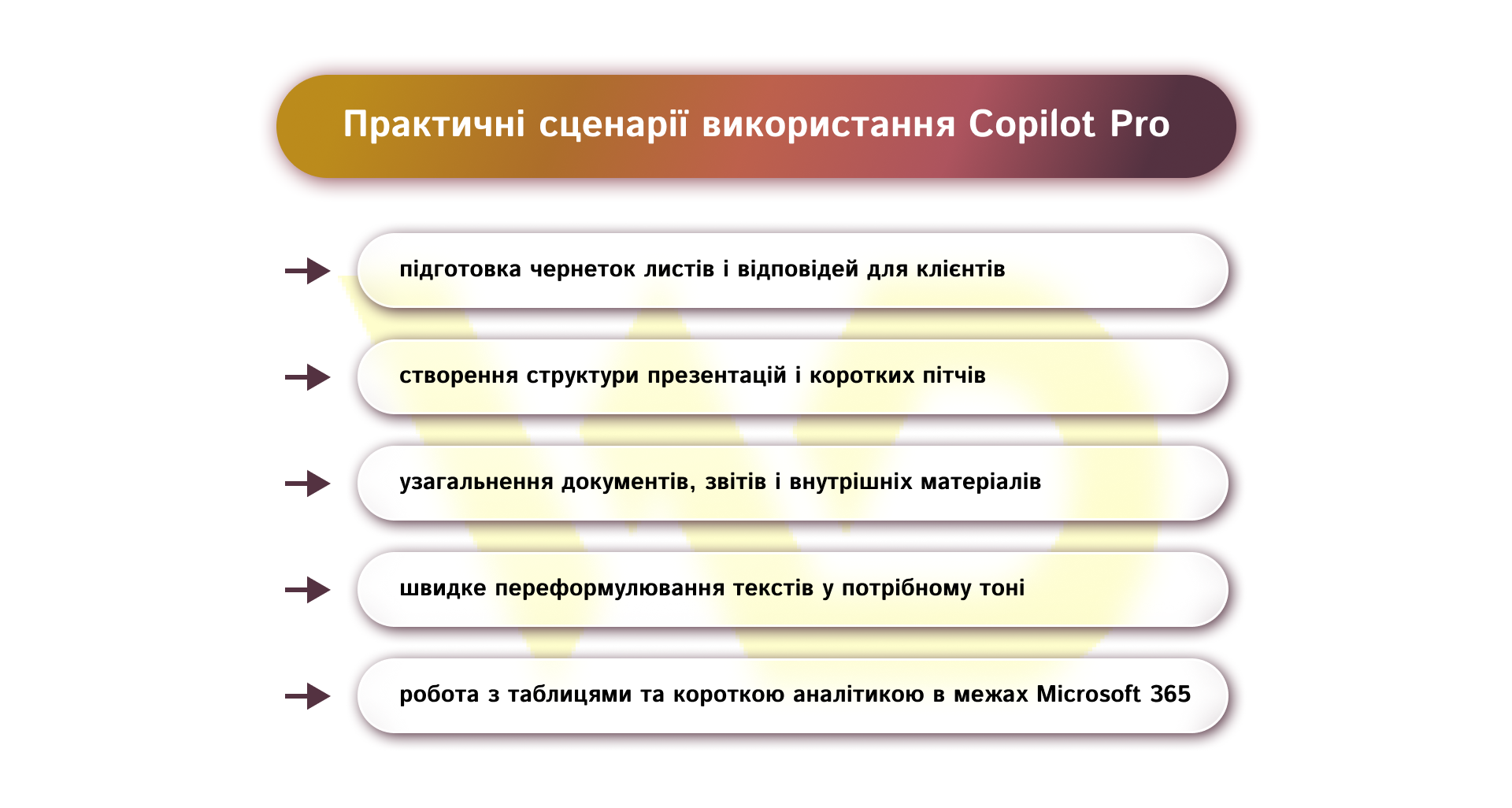
Copilot Pro in teamwork: examples for different departments
Copilot Pro works best when businesses need to quickly turn an idea into working material without unnecessary delays.
Marketing and content
For marketing teams, Copilot Pro is convenient for drafting posts, campaign ideas, short announcements, presentation structures, and texts for commercial materials. For example, a marketer can get headline options for an article in a few minutes and then adapt them to the brand tone. This is especially useful when you need to quickly test several approaches to presentation.
Sales and customer communication
In the sales department, Copilot Pro helps to generate letters, commercial offers, meeting summaries, and answers to common inquiries. It’s useful for managers who work with repetitive communication on a daily basis and want to spend less time on standard texts. For example, instead of writing a letter from scratch every time, a specialist can get a working framework and quickly add to it.
Managers and project teams
For managers and executives, Copilot Pro is useful for working with documents, reports, and internal materials. It helps to summarize large amounts of information, structure thoughts, and prepare working drafts. This is especially valuable when you need to quickly navigate data or prepare material for a team or client.
Operational processes
In your daily operational work, Copilot Pro can support the creation of templates, instructions, internal messages, and summaries.
The more repetitive tasks and daily communication you have, the more you will benefit from the paid version of Copilot Pro.
How to formulate prompts effectively in Copilot Pro
The quality of a prompt determines how useful the result will be. Microsoft explains that a prompt is an instruction or question to Copilot, and a strong prompt usually contains four elements: purpose, context, expectations, and source. The more precisely the task is formulated, the less time it will take to finalize the answer.
For business, requests that make it immediately clear what needs to be done work best. Give Copilot a role if you need a certain style of response, for example: «act like a marketer», «act like an editor», «act like an analyst». Continue with the action verb:
- create;
- summarize; summarize
- reformulate
- compare
- structure
- prepare;
- Analyze.
This way, Copilot understands the intention faster and gives a more relevant answer. When writing a prompt, it’s helpful to think in terms of a specific work task rather than a general wish. The following elements should be added to the prompt:
- goal — what exactly needs to be done;
- context — for whom and in what situation;
- expectations — in what format the result is required;
- source — what materials or data should be taken into account.
In other words, if Copilot is to work with your specific context, be sure to use your own data or document fragments when creating a request.
For example, instead of «prepare a text», it is better to write: «Prepare a short official letter for the client about the change in the project launch date, up to 120 words, without unnecessary explanations, in a businesslike tone». Or, if you need a presentation on a specific topic, change the request to «prepare a presentation» to «create a presentation» structure for the client about the benefits of SEO promotion of local business: 6 slides, business tone, emphasis on results and stages of work. This is a completely different request and sets a clear direction for Copilot.
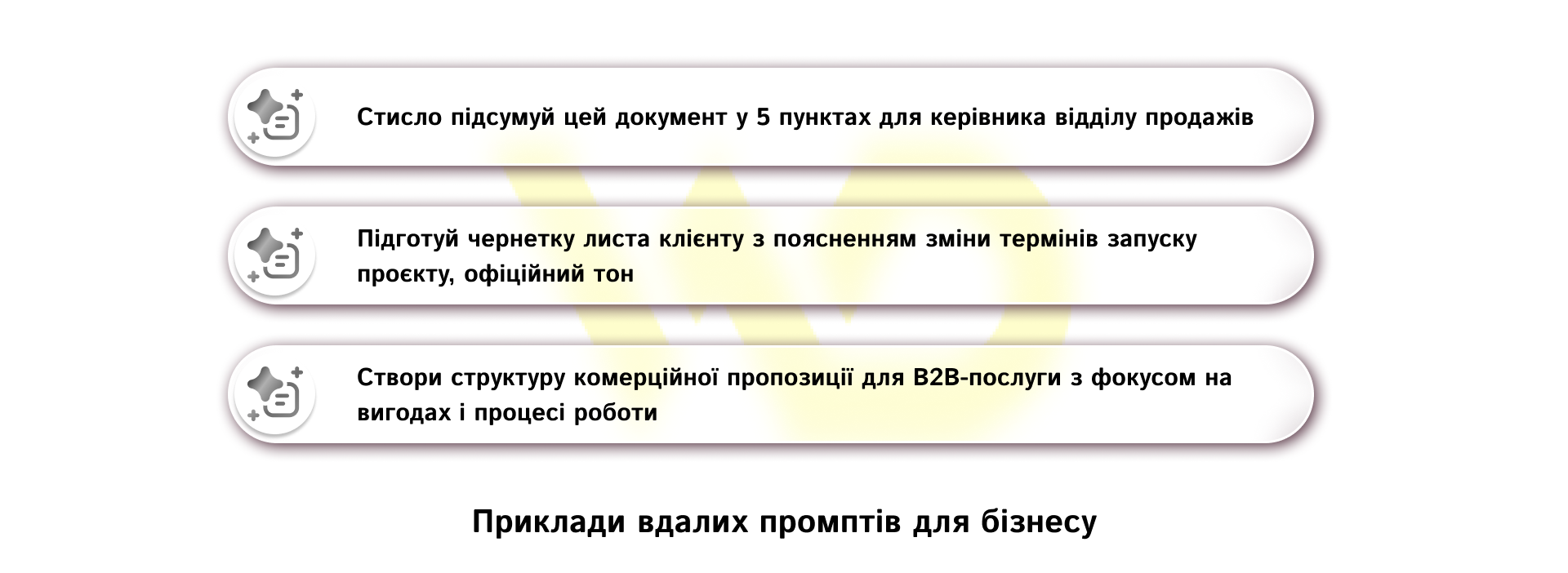
It’s also helpful to break down a complex task into several steps. If you need to create a large piece of material, it is better to first ask Copilot to suggest a structure, then write each block separately, and only then ask it to shorten or adapt the text to the desired format. Microsoft advises not to stop at the first option, but to refine the request and work iteratively to make the result more accurate.
For daily work, it is convenient to have several templates of prompts that can be adapted to different tasks. Microsoft recommends using the sample queries as a starting point and gradually improving them to suit your own processes.
When to upgrade to Copilot Pro
It makes sense to upgrade to the paid version when AI has become a regular part of the workflow rather than a one-time assistance. Copilot Pro is justified for those who prepare draft emails, short reports, presentations, internal materials, or work with a large number of similar texts on a daily basis. In such a scenario, a paid subscription doesn’t give you a «wow» effect, but a more stable and convenient way to close your routine faster.
It’s important to look at the frequency and type of tasks rather than the fact that you have an AI subscription. If you need Copilot only occasionally — for example, for a few ideas a week or a short text edit — the free version is usually enough. The paid version starts to pay off when it saves time almost every day: it removes repetitive tasks, speeds up the preparation of materials, and reduces the number of manual edits. This is exactly the case when a small acceleration on each task accumulates into a noticeable effect for a team or a specialist.
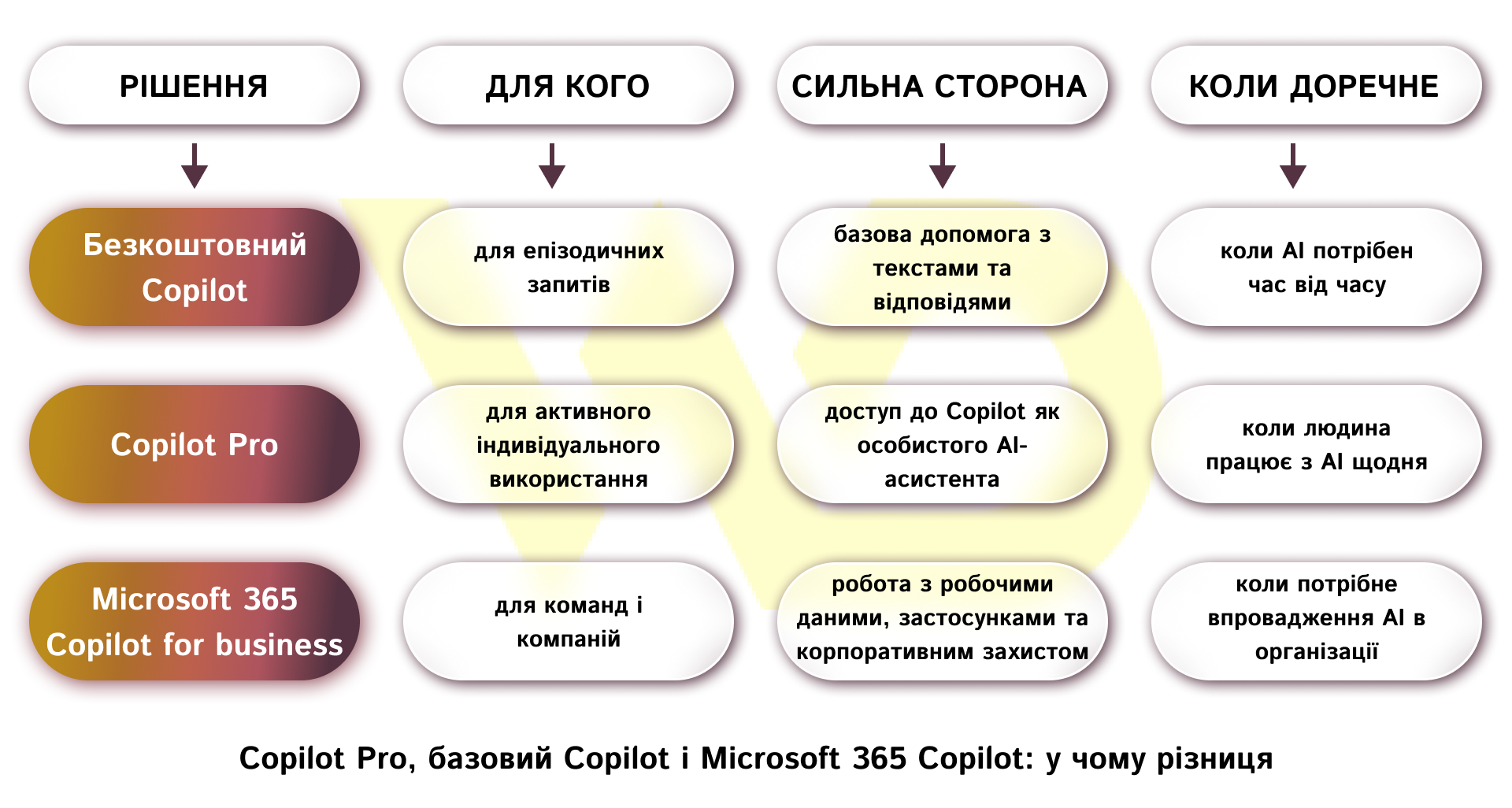
It is important to start from the primary task, and not to look for a universally better option.
When it’s better not to rush to pay
If you need Copilot only for individual ideas, rare drafts, or one-off texts, the paid version may not provide tangible added value. In such a situation, it’s wiser to test a basic scenario first, see how much time you save, and only then decide whether you need a subscription. This is especially important for businesses, as it is worth paying not for the mere fact of access to AI, but for the actual reduction of routine and increase in productivity.
Before activating the paid version, you should clearly define
- who will use Copilot in their daily work;
- what specific tasks it should cover (texts, reports, correspondence, analytics);
- whether the team works in the Microsoft ecosystem on a regular basis.
This approach allows you to evaluate not the formal need for AI, but its practical benefits for the business and avoid a situation where the tool is connected but not integrated into real processes.

commercial offer
Other articles by the author

25/02/2026
UTM tags are special parameters that are added to a regular sitelink after a question mark.

26/03/2026
The benefits of integrating AI into PPC processes go beyond simply “faster text generation.” It’s about a fundamental shift in approach.

18/08/2026
Advertising through bloggers is one of the fastest ways to attract customers to a business. However, every year, companies waste significant portions of their budgets by purchasing ad space on profiles with fake audiences.
Latest articles by #Useful tips

09/09/2026
The Facebook lead form helps businesses collect contact information from potential customers directly from an ad, without requiring them to visit the website.

08/09/2026
Today, an influencer is a distinct media platform with its own editorial policy, a keen understanding of its audience, and an established level of trust.

04/09/2026
Instagram Shopping is a set of Meta features that allows businesses to integrate their product catalog with their social media profile.