

 12/06/2026
  1249
1249

Інтернет-маркетинг
простою мовою
Content of the article

What is user experience (UX): a complete guide to user experience

The battle for the customer’s attention has turned into a battle for their comfort. The days when a website listing product was enough for successful sales are long gone. Today, users decide whether to trust a brand in a matter of seconds, and user experience (UX) has become a key factor in this process.
In this guide, we’ll take a detailed look at how experience design turns casual visitors into loyal customers, which metrics allow you to measure «usability» in numbers, and why investing in UX is currently the most cost-effective solution for any company’s marketing strategy.
What is user experience (UX)
The term user experience (UX) is often oversimplified, reduced to nothing more than the ease of clicking buttons. However, in a professional context, UX is a holistic ecosystem of human interaction with a brand, digital product, or service. It is the sum of cognitive, emotional, and behavioral reactions that arise in the user before, during, and after contact with your system.
At the core of UX lies the psychology of perception. When a person interacts with an interface, their brain constantly evaluates two key parameters:
- cognitive load — a high-quality UX aims to minimize this load by making the system «transparent» so that the user can focus on their goal rather than the tool;
- emotional reward — if the system meets the user’s expectations, trust is built, which is the foundation for long-term loyalty.
UX as an analytical discipline
It is important to understand that UX is not based on a designer’s intuition. It is a strictly iterative process grounded in data and research into human behavior. User experience is shaped by several key components.
- Utility. If the functionality is irrelevant, even the most user-friendly interface will be of no value.
- Usability: How easily can a person perform basic tasks when first encountering the product? How quickly can they regain these skills after a long break?
- Efficiency. A professionally designed UX shortens the path to results by removing unnecessary obstacles.
- Brand Perception. UX is the bridge through which a company’s values are conveyed. How your app or website functions tells the customer more about your reliability and expertise than any advertising campaign.
Nevertheless, UX is inherently subjective, as it pertains to a specific person’s individual experience. It depends on the user’s prior experience, their physical state, surroundings, and even the technical specifications of the device. For example, the experience of interacting with a banking app in a calm home environment and while rushing in line at the checkout will be completely different.
The goal of a UX strategy is to anticipate these scenarios and ensure a consistently high-quality interaction under any circumstances.
Why businesses need to invest in UX
Investments in UX are often perceived as «design expenses», but a professional approach views them as a high-return asset. World-class research confirms a direct link between interface usability and a company’s financial performance.
Return on investment (ROI)
According to Forrester Research, every dollar invested in improving the user experience yields an average of up to $100 in profit. This means that the ROI from implementing high-quality UX can reach 9,900%. This effect is achieved not by magic, but by removing obstacles in the user’s path to purchase.
High-quality UX design during the prototyping phase allows businesses to save significantly. This results in:
- a reduction in the workload on customer support: if the interface is intuitive, customers don’t ask questions like «How do I place an order?» or «Where can I find my settings?»;
- reduced development costs: fixing a logic error at the mockup stage is 10 times cheaper than rewriting the code of a finished product.
To better understand this, let’s imagine an online store with a monthly turnover of 1 million UAH. A UX analysis revealed that 15% of users abandon their cart due to an overly complex registration form. Simplifying this form and adding a one-click purchase option can recover that 15% of lost revenue, resulting in 150,000 UAH in additional profit each month without increasing advertising costs.
How to measure UX effectiveness
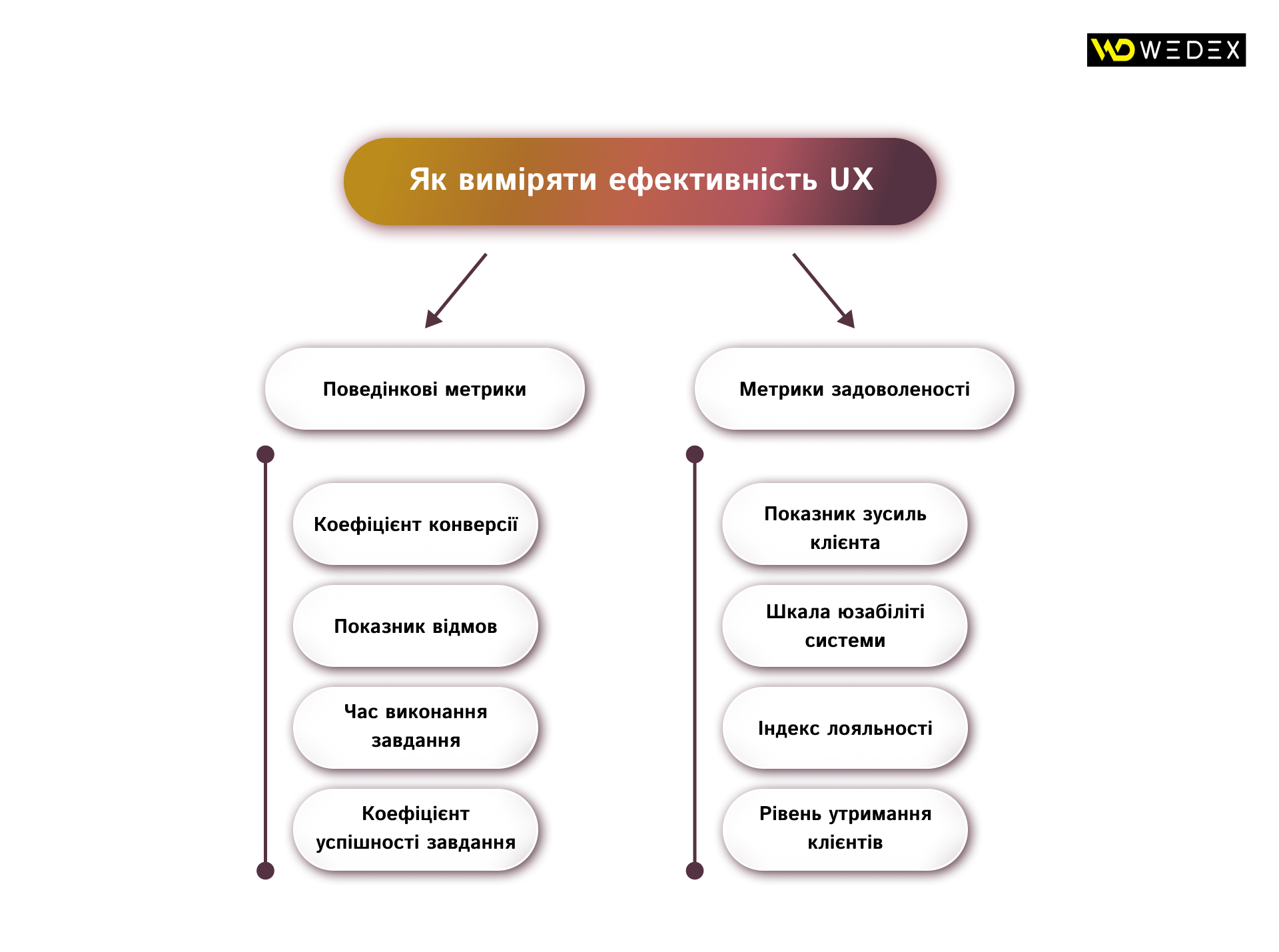
UX effectiveness is not a matter of taste, but a matter of system performance that can be measured using specific KPI. Implementing a metrics system allows you to transform design into a manageable business process.
Behavioral metrics
These are objective quantitative data that demonstrate actual interaction with the product. They are automatically recorded by analytics systems and do not depend on what the user says they show what the user does.
- Conversion Rate (CR). The most important business metric. It reflects the percentage of users who completed a target action (purchase, subscription, lead). If the CR increases after UX changes are implemented, this is direct proof that the interface has become more effective at guiding the customer through the sales funnel.
- Bounce Rate. This metric records the percentage of visitors who leave the site after viewing only one page. A high Bounce Rate (over 70% for commercial pages) often signals critical issues: slow loading speed, irrelevant content, or visual clutter that turns the customer off within the first 2–3 seconds.
- Time on Task. This is the net time a customer spends completing a specific operation, such as paying utility bills or applying for a loan. For service applications, reducing this metric is a priority: the faster a user achieves their goal, the higher their productivity and satisfaction.
- Task Success Rate (TSR). This metric shows the percentage of users who were able to complete the process without errors or contacting support. It is a fundamental indicator of the interface’s «intuitiveness».
Satisfaction metrics
These metrics help measure subjective attitudes, emotional state, and brand perception. They are collected through surveys and feedback forms.
- Customer Effort Score (CES). We ask a direct question: «How easy was it for you to place an order or resolve an issue?». The customer rates the experience on a scale from 1 (very difficult) to 7 (very easy). Research shows that ease of interaction has a stronger impact on loyalty than the «wow factor». Businesses should strive to make the customer’s experience effortless.
- System Usability Scale (SUS). A classic 10-point industry survey. For example: «I found the system easy to use», «I would have needed technical support». The result is converted into a composite score ranging from 0 to 100. A score of 68 is considered average. Anything above 80 represents the level of market-leading products.
- Loyalty Index (Net Promoter Score (NPS)). Measures willingness to recommend a product: «How likely are you to recommend us to friends or colleagues?» A high-quality user experience is the main driver of a high NPS. Users recommend not just the brand, but a pleasant and seamless experience interacting with it.
- Retention Rate. A metric showing the percentage of users who return to the product over a specific period. A high retention rate indicates that the UX has formed a habit in the user or provided such a positive experience that they do not consider alternatives from competitors.
The optimal strategy is to combine both types of metrics. Behavioral data will reveal exactly where users «drop off», while satisfaction metrics will provide insight into what they are feeling at that moment. Only such a comprehensive approach allows for making informed decisions regarding product scaling or redesign.
Fundamental stages of UX design
Creating a high-quality UX is not a creative endeavor, but a systematic methodology that minimizes business risks.
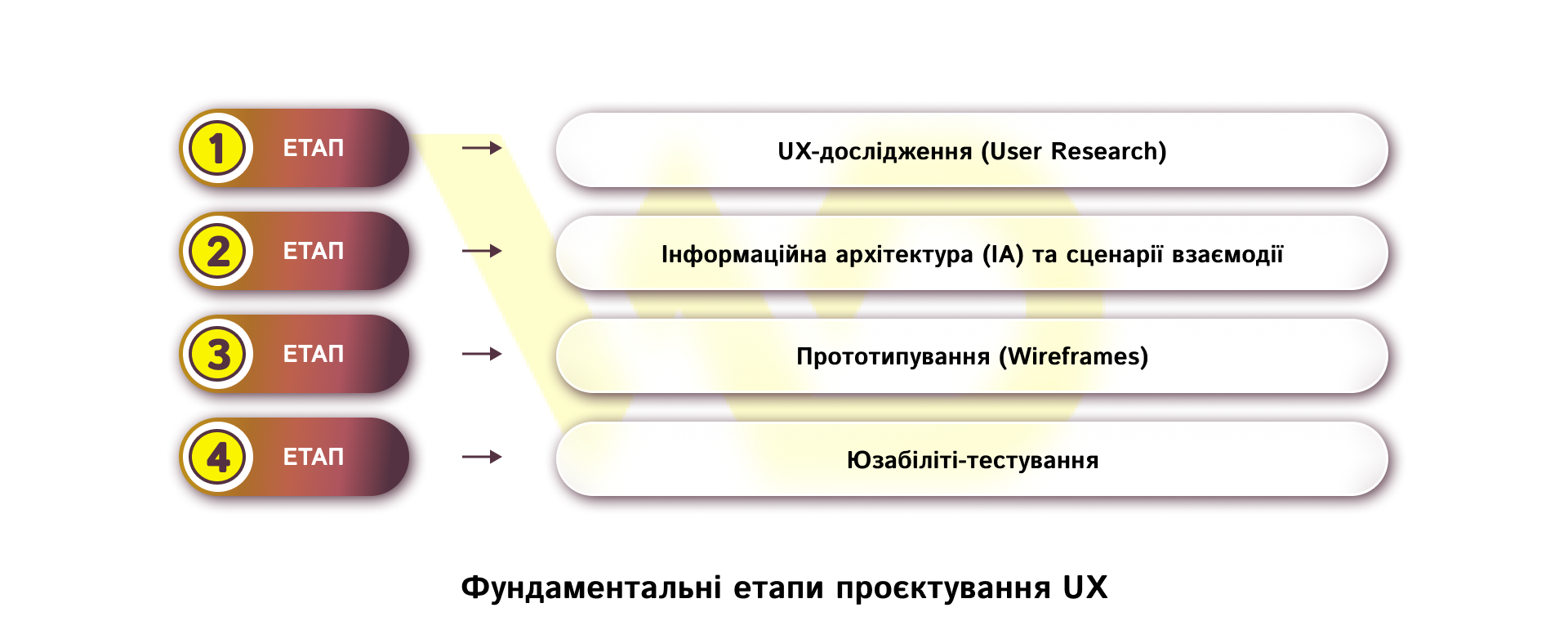
Each stage is designed to ensure you don’t waste your budget on developing features that nobody needs.
UX research
A high-quality user experience is never built on guesswork it is grounded in thorough research. Without this stage, the design risks becoming nothing more than a «pretty picture» that has nothing to do with the actual use of the product. Professional analysis methods allow businesses to move beyond the subjective fantasies of stakeholders and focus on the objective needs of the target audience.
The first step in this process is the persona method. This involves creating detailed profiles of typical users that reflect not only demographic data (gender or age) but also technical skills, life context, and specific pain points. For example, when developing a banking app, we can identify two polar personas: «Alex, 55», who values conservatism, large fonts, and the absence of unnecessary visual clutter, and «Maria, 22», for whom the priority is the speed of transfers via phone number and modern animations. Designing with both personas in mind ensures that the product will be user-friendly for every segment of your audience.
Once we understand who our customer is, it’s important to see how they interact with the brand over time. For this, we use a Customer Journey Map (CJM) — a visual map of all touchpoints between the user and the company, from the moment a need arises to after-sales service. A CJM allows a business to identify hidden «pain points» moments where the customer experiences the most frustration and may decide to switch to competitors.
For example, imagine that during a CJM analysis for an online store, a critical user drop-off was identified at the checkout stage. The research showed that the cause was mandatory registration with email confirmation, which interrupted the purchase process. Implementing a «one-click purchase» option without registration eliminated this barrier and led to a 25% increase in sales.
Thus, research transforms design from a budget expense into a strategic investment that removes obstacles between your product and the customer’s money.
Information architecture (IA) and interaction scenarios
Once we’ve identified who our user is and what challenges they face, it’s time to build the logical framework the information architecture (IA). At this stage, we decide how content will be grouped and organized to make the interaction as predictable as possible. The main rule here is that the user shouldn’t have to think. They must clearly understand where they are at every moment and how to go back a step.
An important tool here is User Flows (interaction scenarios) designing the shortest and most logical paths the user takes to reach their goal. Every extra click along this path is a potential drop-off point, so the UX specialist’s task is to minimize cognitive load.
For example, let’s take a taxi-booking app. An ideally designed scenario is when, upon opening the app, the system — based on previous experience — immediately offers the addresses «Home» or «Work». The user simply needs to confirm the order. If the system forced the user to select a car class or payment method by default every time, it would create an unnecessary hurdle that lowers overall satisfaction with the service.
Prototyping (Wireframes)
The next logical step is to visualize the architecture through prototyping. This involves creating black-and-white mockups (wireframes) that are devoid of colors, complex fonts, or images. This approach allows the team and the business to focus exclusively on functionality and the layout of elements, without being distracted by aesthetic considerations.
For the business, this stage is critical from a development cost perspective. A prototype is the cheapest way to test ideas and hypotheses. Changing the button layout or navigation logic at the sketching stage can be done in a matter of minutes, whereas rewriting finished code or redesigning final layouts can cost the company weeks of programmer work.
For example, while developing a personal account for an insurance company, it became clear as early as the wireframe stage that the critically important «Report an Insurance Claim» button was getting lost among other information. Thanks to prototyping, it was moved to a fixed block that is always in plain sight, even before the budget was spent on design or code development.
Usability testing
The final and most critical stage is usability testing the «moment of truth» when the product reaches a real user. We give the person a specific task, such as «find a product and arrange delivery», and observe their actions without interfering in the process.
This helps identify subtle obstacles and logical pitfalls that a developer or designer’s «tired eye» might simply overlook. The result of such testing is a list of specific fixes that ensure the product won’t trigger a wave of negative feedback or a flood of support requests after its official release.
Let’s imagine that during testing of a hotel booking service, it turned out that users couldn’t complete the task of «booking a room with breakfast». The problem wasn’t in the logic, but in the icon: the graphic symbol for breakfast was so unconventional that people simply ignored it. Replacing the icon with a more recognizable one in a timely manner saved the company from hundreds of cancellations and questions in the support chat.
Thus, by going through the process from in-depth persona analysis to final testing, a business receives not just a website or app, but a polished tool where every element works toward achieving a commercial goal.
Common UX mistakes that cost businesses customers
Even successful brands with large marketing budgets often make mistakes that become invisible barriers to conversion.
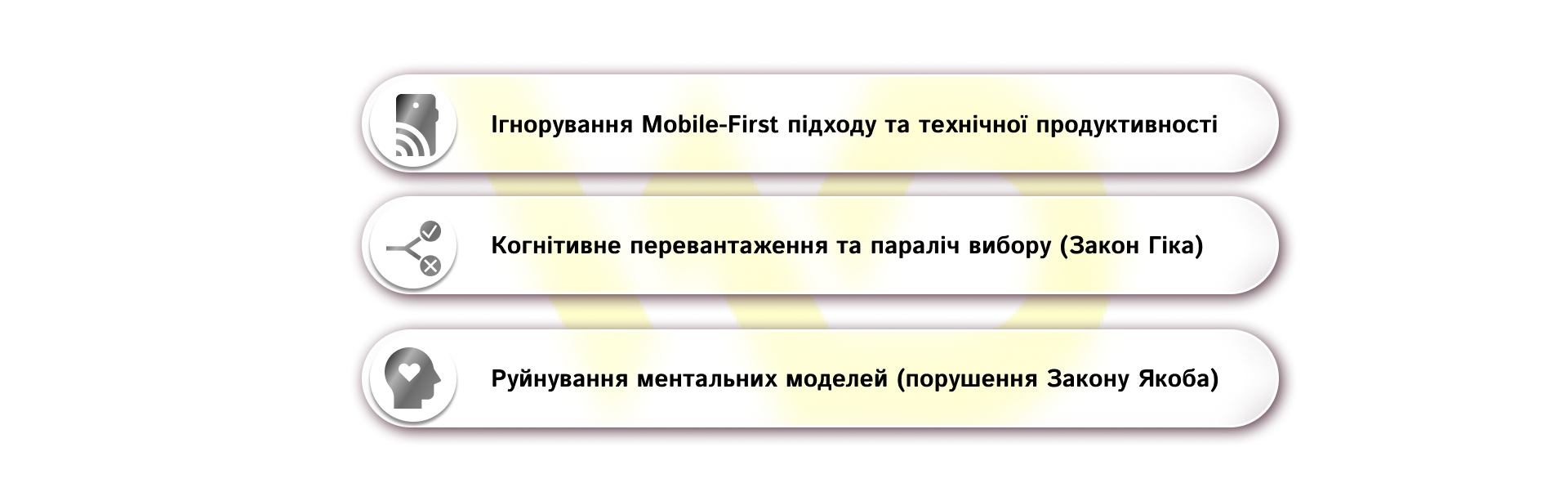
Understanding these «anti-patterns» allows businesses to retain audience loyalty and avoid losses as early as the design phase.
- Ignoring the Mobile-First approach and technical performance.
Today, over 60% of global traffic comes from mobile devices, making responsiveness not just an option, but a critical necessity for business survival. If a website displays perfectly on a desktop but has small interactive elements that are hard to tap with a finger, or awkward navigation on a smartphone the company loses most of its potential leads.
Mobile UX is not just about scaling images, but fully adapting the experience for one-handed use, following the «thumb-first» principle, and accounting for limited screen space. Additionally, page load speed is an integral part of UX. No attractive design can save a product if the user is forced to wait more than three seconds in that case, they’ll simply close the tab and go to competitors.
- Cognitive overload and choice paralysis (Hick’s Law).
UX psychology is based on Hick’s Law: the time required to make a decision increase proportionally to the number and complexity of available options. When a business tries to show everything at once — huge menus, dozens of promotional banners on the homepage, complex registration forms — cognitive overload occurs. Instead of making a choice, the customer feels stressed and often refuses to interact at all.
Solutions for businesses:
-
- simplify forms: every additional field in a registration or order form reduces conversion rates;
- break down processes: instead of a single massive form with 20 questions, break complex processes into logical steps. Three simple screens that guide the user step-by-step are much easier to navigate than a single overloaded page;
- Visual hierarchy: Highlight one main action on the screen (Primary CTA) to direct the customer’s attention, and make secondary options less prominent.
- Breaking mental models (violating Jacob’s Law).
Jacob’s Law states: users spend most of their time on other websites. This means they come to you with pre-formed expectations about how the digital world works. They’re used to the shopping cart being in the top-right corner, the logo linking back to the homepage, and underlined text being a link.
A business’s desire to be «unique» and «creative» often leads to breaking these familiar patterns. If you change the standard layout of elements or invent your own navigation logic, the user is forced to expend effort relearning. If the interface isn’t clear from the very first seconds, people get frustrated and go somewhere where everything is familiar and simple.
Working to eliminate these mistakes allows you to transform a website from a list of pages into an effective sales funnel that respects the customer’s time and generates stable revenue.
How to improve existing UX: a strategy of targeted changes
For many companies, the term «UX design» is associated with a large-scale and expensive redesign. However, in the real world of business, a complete product overhaul isn’t always practical. Often, the highest ROI comes from iterative, targeted improvements to the existing interface. If your product is already up and running, the path to its improvement lies through in-depth analysis and hypothesis testing:

Conducting a UX audit
The first step toward improvement is a comprehensive audit that combines an expert assessment of compliance with usability heuristics and an analysis of actual user behavior. This allows you to identify both obvious technical errors (broken links, slow loading) and underlying logical flaws.
One of the most effective tools at this stage is heatmap analysis. Services like Hotjar allow you to visualize the areas of highest activity: you can see where clicks occur most frequently, and which interface elements users ignore, considering them unimportant or non-clickable.
At the same time, funnel and form analysis is conducted. By measuring the bounce rate for each specific form field — such as phone number or date of birth — you can clearly identify which question acts as a barrier, deterring the customer from completing the conversion.
Continuous iteration and A/B testing
It’s important to realize that UX isn’t a one-time event, but an ongoing process. After identifying issues through an audit, the next step is to implement changes using A/B testing. This allows you to make decisions based on data, not personal preferences.
The process looks like this:
- Formulating a hypothesis: based on audit data, you hypothesize: «If we make the order button more contrasting and place it higher up, the number of purchases will increase»;
- Launching the test: the system automatically splits the traffic: some users see the original version; others see the new one;
- analyzing results: you implement changes on a permanent basis only when the data confirms a statistically significant improvement in metrics.
This «research — hypothesis — test» cycle transforms subjective assumptions into a data-driven growth strategy. It proves that behind every successful digital product lies not luck, but a deep understanding of human behavior and a willingness to adapt continuously. It is this analytical approach to user experience that determines who will remain a market leader and who will fade into the background.
It is worth emphasizing: in a world where technology is becoming increasingly accessible, user experience is becoming the key competitive advantage. For a business striving for sustainable growth, it is crucial to integrate UX thinking into all processes. By developing your product’s UX, you are not just improving your website or app you are demonstrating respect for your customer. And in modern marketing, respect and comfort are the shortest path to high conversion rates and stable profits.

commercial offer
Other articles by the author

01/07/2026
An effective profile header isn't just attractive text it's a clearly structured, modular system in which each element serves a specific marketing function.

04/03/2026
A loyalty program is not just a discount tool, but a multidimensional business strategy.

02/06/2026
The best specialists are those who can see the real problems faced by clients and the needs of the business behind the lines of code.
Latest articles by #Useful tips

11/09/2026
Email remains the primary channel for business communication, but at the same time, it serves as the main “entry point” for various cyber threats.

10/09/2026
The leader's primary goal is to create conditions under which every employee works to the best of their ability, with a clear understanding of the overall direction.

09/09/2026
A well-chosen domain name strengthens the brand, shapes customers' first impressions, and facilitates search engine optimization, whereas a mistake at the outset can cost a company lost traffic and reputational risks.